How to Use These Trello Board Examples to Organize Your Entire Life and Business
Trello’s visual Kanban system is widely regarded as one of the most adaptable productivity frameworks available today. Whether you are managing a multi-million dollar marketing campaign, tracking dental office patients, or organizing a personal reading list, the core structure remains the same: Lists represent stages of a process, and Cards represent individual tasks. This article provides copy-and-paste board layouts for business operations, niche industries, and advanced automation workflows.
When staring at a blank digital canvas, building a productivity system from scratch can feel overwhelming. Fortunately, you do not need to reinvent the wheel. According to recent data from AgileSherpas, 59% of high-performing marketing teams utilize Kanban boards to manage their workflows, with 45% specifically preferring digital iterations like Trello.
The true value of Trello lies in its flexibility. A board can serve as a simple to-do list or function as a complex, automated database relying on parent-child card syncing. By examining proven Trello board examples, you can bypass the trial-and-error phase and immediately implement layouts that have been stress-tested by industry professionals.
Why a Simple Kanban Board Remains a Top Productivity Choice
Before diving into complex automations and multi-board setups, it is crucial to understand the foundation of almost every successful Trello template: the Kanban methodology. Originating in Japanese manufacturing, Kanban is a visual system for managing work as it moves through a process.
The "To-Do, Doing, Done" Logic
The most basic—and often most effective—Trello board consists of three simple lists. This layout works because it physically prevents you from starting too many tasks at once, a concept known in project management as limiting Work In Progress (WIP).
- To-Do (The Backlog)
- This list holds every task that needs to be completed. It acts as a brain dump, ensuring nothing is forgotten. Cards here should be prioritized, with the most important items at the top.
- Doing (In Progress)
- This is where active work happens. A common rule among productivity experts is to never have more than three cards in this list at any given time to prevent context switching.
- Done (Completed)
- Moving a card to the "Done" list provides a psychological boost. Over time, this list serves as a historical record of your accomplishments and helps with future capacity planning.
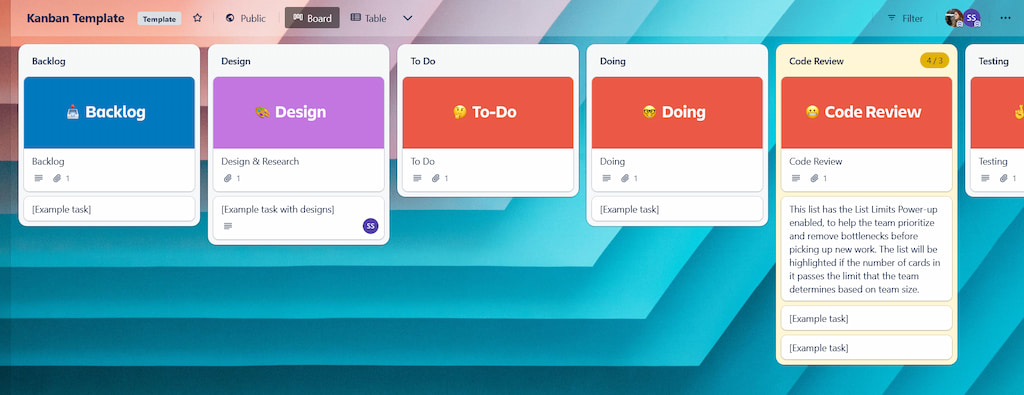
Image source: Everhour
To make these boards highly glanceable, many users rely on Card Covers. By attaching an image or selecting a solid color for the top of a card, you can instantly categorize tasks by project type or client without needing to read the card titles.
How to Manage Complex Projects with Agile and Scrumban Layouts
While a basic three-list Kanban board is excellent for personal tasks, larger teams often require more structure. This is where "Scrumban" comes into play. Scrumban is a hybrid methodology that combines the structured sprint planning of Scrum with the continuous flow of Kanban.
The Marketing Team’s Secret Weapon
Marketing departments, software development teams, and event planners frequently rely on Scrumban layouts to manage high volumes of work without burning out their staff. Instead of a single massive "To-Do" list, work is segmented by timeframes and approval stages.
A highly effective Scrumban board typically follows this list structure:
- Icebox / Ideas: Raw concepts that have not been vetted or approved.
- Upcoming (Backlog): Approved tasks that need to be done, but not this week.
- Sprint Backlog (This Week): The specific tasks the team has committed to finishing during the current work cycle.
- In Progress: Tasks currently being worked on.
- Review / QA: Tasks awaiting manager approval or peer review.
- Done: Completed work.
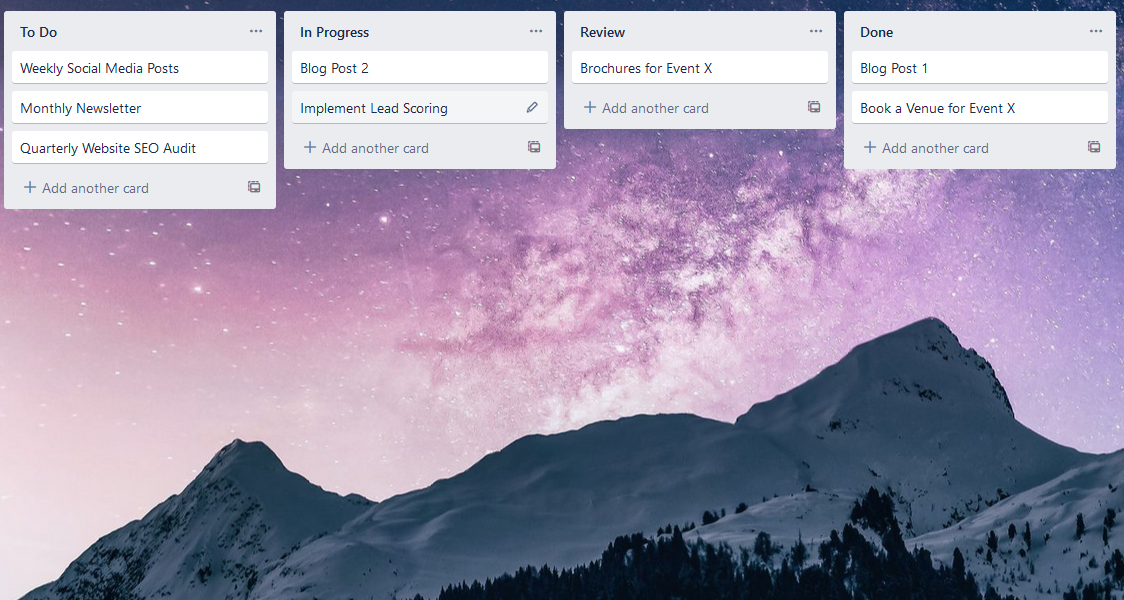
Image source: Agile Sherpas
| Feature | Standard Kanban | Scrumban Layout |
|---|---|---|
| Planning Horizon | Continuous flow (pull tasks as needed) | Time-boxed (usually 1-2 week sprints) |
| List Complexity | Low (3-4 lists) | High (6+ lists including QA and Review) |
| Best Used For | Personal tasks, ongoing support tickets | Campaign launches, product development |
| Capacity Management | Visual limits on "Doing" column | Strict limits on the "Sprint Backlog" |
5 Business Operations Boards That Keep Your Company Running Smoothly
Trello is frequently utilized as a central hub for business operations. By creating dedicated boards for different departments, leadership teams can maintain a bird's-eye view of company health. Here are five essential business operations boards that rank among the top choices for modern companies.
1. The Company Overview Board
Often used by executive teams, this board acts as a company intranet. It does not track daily tasks; instead, it houses high-level information. Lists typically include "Company Goals (Q1-Q4)," "Important Links & Resources," "Team Directory," and "Major Milestones." This ensures that every employee, regardless of department, has access to the company's north star metrics.
2. Content Calendar and Campaign Tracking
Managing the lifecycle of a blog post, video, or social media campaign requires strict oversight. A content calendar board moves cards through the editorial process. Lists usually include: Concept, Briefing, Drafting, Editing, SEO Review, Scheduled, and Published. Using the Calendar Power-Up allows content managers to toggle between a list view and a monthly calendar view to spot publishing gaps.
3. New Employee Onboarding
First impressions matter, and a disorganized onboarding process can frustrate new hires. Creating a template board for new employees is an excellent choice for HR departments. The board serves as a "First Week" checklist. Lists can be organized chronologically: Before Day 1, Day 1, Week 1, Month 1. Cards contain links to employee handbooks, software setup instructions, and introductory meeting schedules.
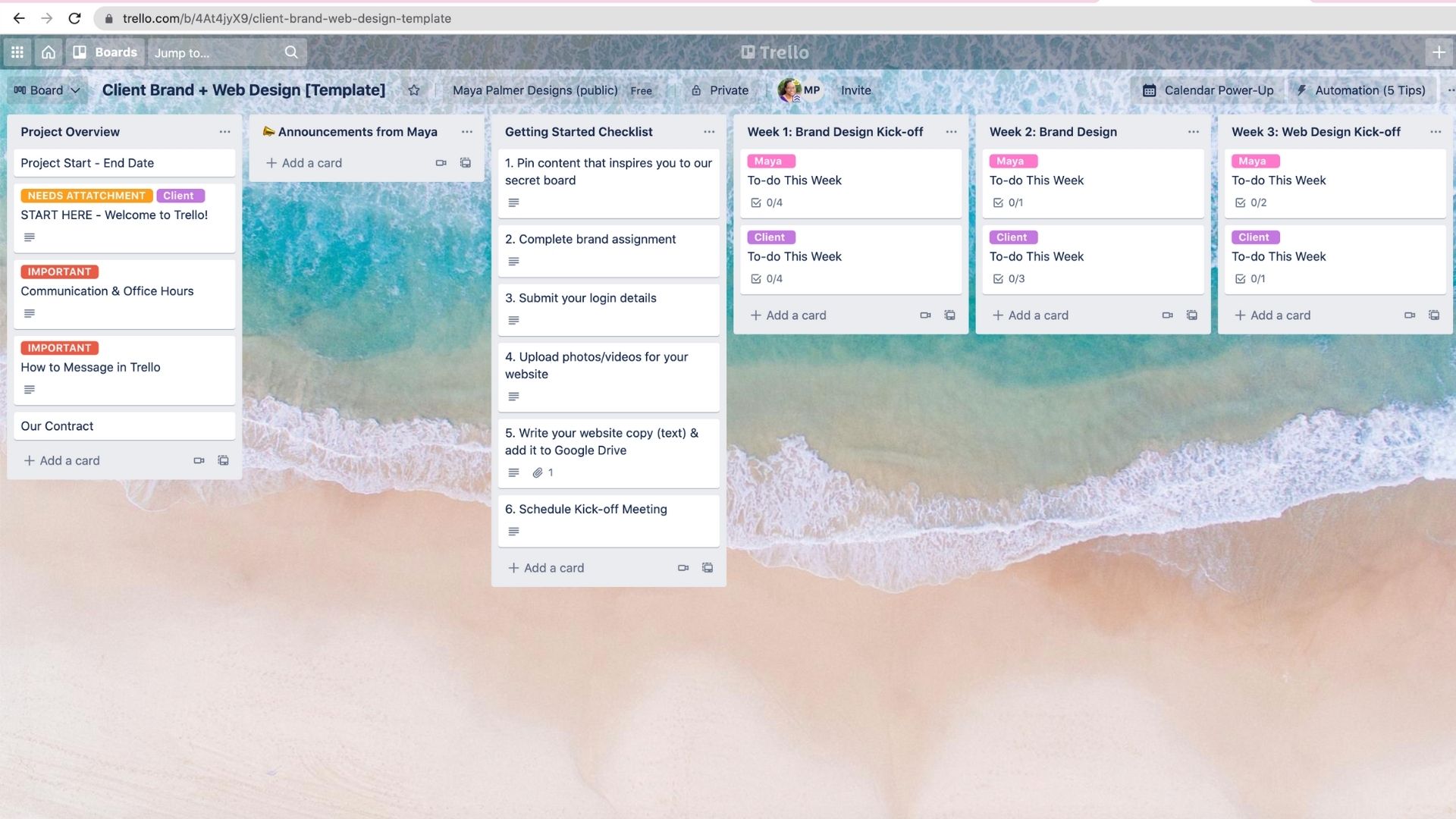
Image source: Maya Palmer Designs
4. Sales Pipeline Management
While dedicated CRMs exist, many small businesses and freelancers find Trello to be a highly competitive alternative for tracking sales. A pipeline board visualizes the customer journey. Cards represent individual clients or deals, moving through lists like: New Lead, Contacted, Demo Scheduled, Proposal Sent, Negotiation, Closed Won, and Closed Lost. Custom fields can be added to track deal value and contact information.
5. Customer Feedback and Feature Requests
Transparency builds trust. Many software companies maintain a public-facing Trello board where users can submit and vote on feature requests. Lists might include Under Consideration, Planned, In Development, and Shipped. This not only crowdsources product development but also reduces support tickets by showing users that their requests are already being addressed.
Unique Trello Examples for Niche Industries Beyond Tech
While Trello is heavily associated with software development and marketing, its flexible architecture makes it a strong contender for organizing physical, real-world operations. Professionals in non-tech industries frequently adapt the platform to solve unique logistical challenges.
Animal Welfare and Foster Management
Animal shelters and rescue organizations often struggle with logistical chaos, frequently relying on cluttered Facebook groups or messy spreadsheets. According to discussions within the Maddie's Fund Animal Welfare community, Trello has become a highly popular tool for foster coordinators.
A typical Foster Management board utilizes the following structure:
- Intake / Medical Hold: Animals currently receiving veterinary care.
- Available for Foster: Animals cleared to leave the shelter.
- In Foster: Animals currently placed in homes.
- Adopted: A historical record of successful placements.
Rescue workers use the "Card Covers" feature to display a photo of the animal, making the board instantly recognizable. Custom fields are utilized to track microchip numbers, age, weight, and behavioral notes, ensuring all medical history travels with the digital card.
Dental Office Operations
Managing patient flow and administrative tasks in a healthcare setting requires precision. Some dental offices use Trello to track lab cases and administrative duties. A board might track custom dental appliances (like crowns or retainers) moving from Impressions Taken to Sent to Lab, Received from Lab, and Patient Scheduled for Fitting. This visual system prevents expensive lab work from falling through the cracks.
Community Support Desks
For online communities, managing duplicate questions is a constant battle. The Infinite Flight Community utilizes a public Trello board as a "Known Issues" tracker. Instead of users flooding the forums with the same bug report, they can check the Trello board to see if the issue is already in the Investigating or Fix Pending lists. This significantly reduces administrative overhead for community moderators.
How to Use Advanced Automation to Make Your Boards Work for You
Setting up a board is only the first step. To truly optimize your workflow, you must leverage Trello's built-in automation tool, Butler. Automation reduces manual data entry and ensures processes are followed consistently.
"Automation is what transforms Trello from a simple digital whiteboard into a highly capable relational database. If you are manually moving cards and tagging people all day, you are missing out on the platform's true potential."
The Power of Parent-Child Card Syncing
One of the most advanced workflows involves "Parent-Child" card relationships. As detailed by Trello expert Brittany Joiner in a recent Reddit AMA, you can use automation to link a high-level project card to multiple individual task cards.
How it works: You create a "Parent" card (e.g., "Q3 Website Redesign") with a checklist. Using Butler automation, you can set a rule that converts every item added to that checklist into a separate "Child" card on a different board (e.g., the Web Development team's board). When the developers move their Child card to "Done," the automation automatically checks off the corresponding item on the Parent card's checklist. This allows executives to track progress without micromanaging the development board.
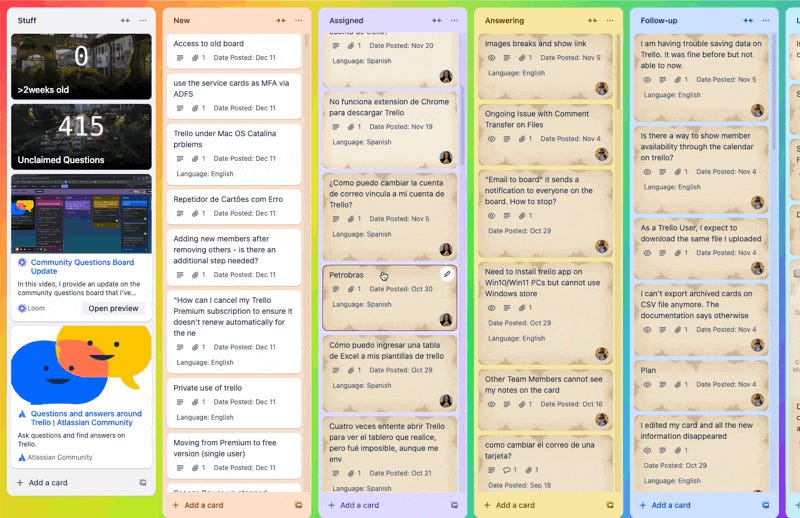
Image source: How To Trello - Substack
Bulk Actions for Board Maintenance
Over time, boards can become cluttered with outdated due dates and irrelevant labels. Standard automation triggers when a specific action occurs, but it cannot retroactively clean up a messy board. For this, power users rely on the Bulk Actions Power-Up. This tool allows you to select dozens of cards simultaneously and shift all their due dates forward by a week, or apply a new label to 50 cards at once, saving hours of manual clicking.
Creating an External Inbox
Context switching—jumping between email, Slack, and project management tools—is a major productivity killer. A top-tier strategy is to turn a Trello board into an "External Inbox." By integrating tools like Akiflow or Fillout, you can funnel external communications directly into a Trello list.
For example, you can set up a rule where any email starred in Gmail automatically creates a card in your Trello "To-Do" list, complete with the email body in the card description. This centralizes all actionable items into a single visual space.
Personal Life Hubs for Managing Hobbies and Friendships
Trello is not strictly for corporate environments. Many users find it to be an excellent choice for managing their personal lives, treating the platform as a digital life hub.
The "Reading List" and Media Tracker
Avid readers and cinephiles often use Trello to track their media consumption. A media tracking board typically features lists like To Read/Watch, Currently Consuming, Did Not Finish (DNF), and Completed. Users can attach book covers to the cards, use labels to categorize genres (Sci-Fi, Non-Fiction, Fantasy), and use the description field to write personal reviews or save favorite quotes.
Maintaining Friendships and Networking
As lives get busier, maintaining relationships requires intentional effort. Some users build a "Personal CRM" (Customer Relationship Management) board. Cards represent friends, family members, or professional contacts. Lists can be organized by contact frequency: Reach out Weekly, Monthly, Quarterly, and Yearly. By utilizing the "Aging Power-Up," cards will visibly fade or change color if they haven't been interacted with recently, serving as a visual nudge to send a text or schedule a coffee date.
Travel and Bucket List Planning
Planning a complex international trip involves juggling flights, hotel reservations, and itinerary ideas. A travel board can organize these elements visually. By enabling the Map Power-Up, users can add physical locations to cards. When toggled to the Map view, all the restaurants, museums, and hotels you want to visit appear as pins on an interactive map, making geographical itinerary planning significantly easier.
How to Solve Common Trello Problems Like Notification Overload and Board Clutter
Even the most meticulously designed boards can become unwieldy if not properly maintained. As teams grow and more data is added, two primary issues consistently arise: notification fatigue and visual clutter.
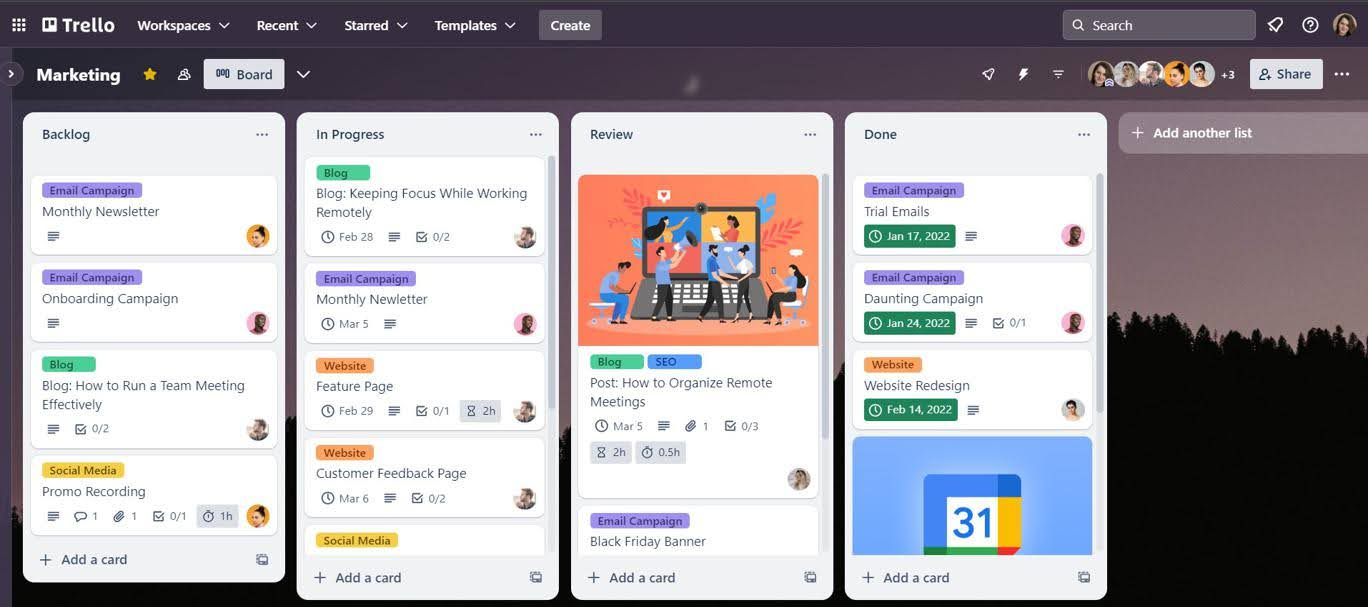
Image source: Planyway
The "Notification" Problem
When multiple people collaborate on a board, the default notification settings can quickly overwhelm an inbox. Users often complain about receiving alerts for every minor checklist update or card movement.
The Solution: Instead of relying on default notifications, use targeted Butler automations. You can disable general board tracking and instead create a rule that says: "When the red 'URGENT' label is added to a card, send an email to [Manager's Email] and post a message to the #project-updates Slack channel." This ensures that leadership is only alerted when their attention is genuinely required.
The "Clutter" Problem
Boards often become dumping grounds for reference materials, standard operating procedures (SOPs), and general announcements, which buries actionable tasks.
The Solution: Establish a strict separation between "Information" and "Action." Create a dedicated list on the far left of the board titled "Resources" or "Read Me First." Place all non-actionable reference cards here. To make them visually distinct from tasks, apply a specific colored Card Cover to all resource cards. This trains the team's eyes to recognize that column as a library, rather than a to-do list.
Frequently Asked Questions
How do I copy a Trello board from an example?
Are Trello templates free to use?
What is a highly recommended Trello board layout for a daily schedule?
How do I organize a Trello board for a large team?
Can I use Trello for Scrum and Kanban at the same time?
How do I stop cards from piling up in the "Done" list?
The Bottom Line
Trello’s visual framework is highly adaptable, but its true potential is unlocked when you move beyond basic lists and tailor the architecture to your specific workflow. Whether you are managing a marketing sprint or organizing a personal reading list, success relies on clear categorization and automated maintenance.
- Start simple with a basic Kanban (To-Do, Doing, Done) before adding complex Scrumban lists.
- Leverage Butler automation to handle repetitive tasks, such as parent-child card syncing and automatic labeling.
- Utilize niche layouts for non-tech industries (like animal rescues or dental offices) to significantly reduce administrative overhead.
- Address visual clutter early by creating dedicated "Resource" lists and using Card Covers for immediate visual recognition.
- Prevent notification fatigue by customizing alerts to trigger only for high-priority labels or specific card movements.
To get started today, select one of the board examples above, copy the list structure into a new Trello workspace, and set up just one simple automation rule to immediately streamline your workflow.