How to Use an SEO Blog Template to Rank on Page One
With over 600 million blogs active on the internet today, publishing a wall of text and hoping for organic traffic is no longer a viable strategy. Earning a spot on the first page of search results requires a systematized methodology. This is where an SEO blog template becomes an essential tool in your content marketing arsenal.
However, there is a common point of confusion that must be addressed immediately. When people search for an "SEO template," they are usually looking for one of two entirely different things:
- A Writing Outline (Content Template): A structured framework for writers (often in Google Docs or Word) that dictates where to place headings, keywords, and calls-to-action to satisfy user intent.
- A Website Theme (CMS Template): The actual HTML, CSS, and JavaScript code used on platforms like WordPress or Blogger that dictates how the site looks and how search engine bots crawl the pages.
This guide covers both. We will provide 10 proven writing outlines to structure your content, and we will also address the technical code requirements your website theme must meet to ensure your writing actually gets indexed.
What Is an SEO Blog Template and Why Do You Need One?
An SEO blog template is a repeatable framework that ensures every piece of content you publish adheres to on-page optimization best practices. According to industry analysis by Courey Wong, standing out in a sea of hundreds of millions of blogs requires moving away from "freestyle" writing and adopting a structured approach.
Using a template solves several critical problems for content creators:
- Eliminates Blank Page Syndrome: Staring at a blank document is the biggest hurdle to consistent publishing. A template provides a fill-in-the-blank structure.
- Enforces Heading Hierarchy: It prevents writers from skipping from an H1 directly to an H3, which can confuse screen readers and search engine crawlers.
- Guarantees Intent Matching: By selecting a template designed for a specific stage of the buyer's journey, you ensure your content actually answers the user's underlying question.
How to Choose the Right Template for Your Search Intent
Not all templates work for all keywords. The most common mistake writers make is using a standard "Listicle" template for a query that requires a deep-dive "How-To" guide. To rank, your content structure must match the search intent.
Search intent generally falls into three stages of the marketing funnel, often referred to as Top of Funnel (ToFu), Middle of Funnel (MoFu), and Bottom of Funnel (BoFu). As noted by Link-Assistant's intent mapping, aligning your content archetype with these stages is critical for conversion.
| Search Intent Stage | Ideal Content Archetype | Primary Goal | Ideal CTA Placement |
|---|---|---|---|
| ToFu Informational | How-To Guides, Glossaries, Listicles | Brand awareness and education | Newsletter sign-up at 50% scroll |
| MoFu Commercial | Product Comparisons, Reviews, Roundups | Evaluation and consideration | Comparison chart mid-post |
| BoFu Transactional | Case Studies, Pricing Guides | Conversion and purchase | Sticky sidebar or bottom discount code |
When targeting BoFu keywords, Victorious emphasizes that your content must include strong signals of authority, authenticity, and expertise (E-E-A-T) to convert readers into buyers.
The Standard SEO Blog Post Anatomy Every Writer Needs
Before diving into specific archetypes, it is important to understand the universal anatomy of an optimized blog post. Regardless of whether you are writing a recipe or a B2B software review, certain structural elements are non-negotiable.
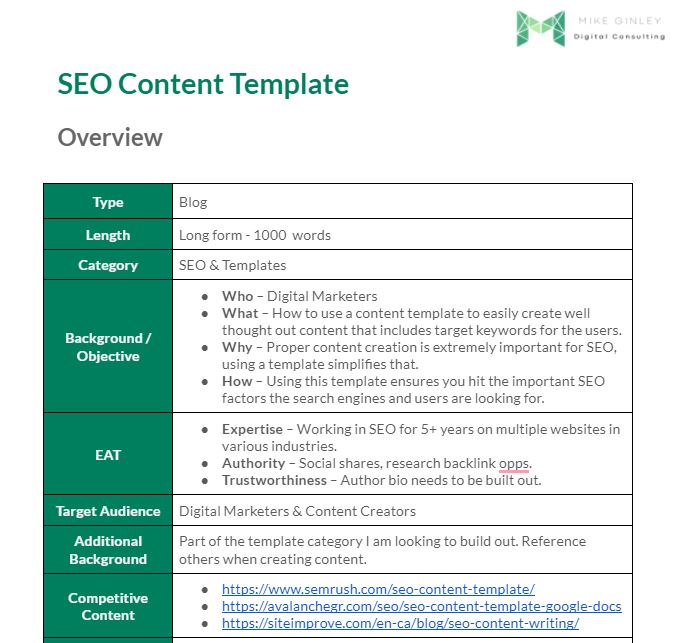
Image source: Mike Ginley
The Strict Heading Hierarchy
Search engines use heading tags (H1, H2, H3) to understand the relationship between different concepts on your page. The rules are strict:
- One H1 Tag: Your page must have exactly one H1 tag, which serves as the main title and should include your primary keyword.
- H2 for Main Sections: Use H2s to break the article into its primary topics.
- H3 for Sub-Sections: If an H2 section needs further breakdown, use H3s. Never place an H3 directly after an H1 without an H2 in between.
The Micro-Intro Rule
According to Ahrefs' content guidelines, long, rambling introductions hurt retention. Modern readers skim. Your introduction should be a "Micro-Intro"—ideally under 150 words. It must hook the reader, state exactly what the article covers, and include the primary keyword naturally within the first few sentences.
The Jump Link Advantage
Including a linked Table of Contents (jump links) near the top of your post significantly improves user experience. Furthermore, Google frequently uses these jump links to generate "sitestructure" snippets (the clickable links that appear under your main search result), which can increase your overall click-through rate.
10 Proven SEO Blog Templates for Every Content Type
Below are 10 structural templates mapped to specific content archetypes. You can copy these outlines directly into your word processor to guide your next draft.
The Definitive How-To Guide
Best for: ToFu Informational queries ("How to tie a tie", "How to start a podcast").
This template focuses on sequential, actionable steps. It ranks among the top choices for capturing Featured Snippets.
• H1: How to [Achieve Specific Result]
• Intro: The Micro-Intro (<150 words)
• H2: What Is [Topic]?
• H2: Why Is [Topic] Important?
• H2: Step-by-Step Instructions
• H3: Step 1: [Action]
• H3: Step 2: [Action]
• H2: Common Mistakes to Avoid
• H2: Conclusion & Next Steps
The High-Volume Listicle
Best for: ToFu Broad discovery queries ("Best marketing tools", "Ways to save money").
Listicles are highly skimmable. The key to a successful listicle is consistent formatting for every item on the list.
• H1: [Number] Ways to [Achieve Result]
• Intro: Hook and criteria for selection
• H2: The Complete List of [Topic]
• H3: 1. [Item Name]
• H3: 2. [Item Name]
• H2: How to Choose the Right Option
• H2: Frequently Asked Questions
The "Vs." Comparison
Best for: MoFu Commercial evaluation ("Mailchimp vs ConvertKit").
Users searching for comparisons are close to making a decision. Provide objective data and clear use cases for each option.
• H1: [Product A] vs [Product B]: Which Is Better?
• Intro: Brief overview of both
• H2: High-Level Comparison (Table)
• H2: Feature 1 Comparison
• H2: Feature 2 Comparison
• H2: Pricing Breakdown
• H2: Final Verdict: Who Should Use Which?
The Deep-Dive Case Study
Best for: BoFu Transactional proof ("How we increased traffic by 200%").
Case studies rely heavily on data, charts, and social proof. They are exceptionally strong assets for sales enablement.
• H1: How [Client] Achieved [Result] Using [Product]
• Intro: Executive Summary
• H2: The Challenge (Before)
• H2: The Solution (Our Process)
• H3: Implementation Steps
• H2: The Results (Data & Metrics)
• H2: How You Can Replicate This (CTA)
The Expert Roundup
Best for: ToFu Link building and social sharing.
By featuring multiple experts, you build E-E-A-T and encourage the featured contributors to share the post with their audiences.
• H1: [Number] Experts Share Their Top Tips for [Topic]
• Intro: Why we asked the experts
• H2: Expert Insights on [Topic]
• H3: [Expert Name], [Title]
• H3: [Expert Name], [Title]
• H2: Key Takeaways from the Experts
• H2: Conclusion
The Product Review
Best for: MoFu Commercial intent ("iPhone 15 Review").
Google's product review update requires evidence of actual testing. Include original photos and specific pros/cons.
• H1: [Product Name] Review: Is It Worth It?
• Intro: Quick verdict and rating
• H2: Pros and Cons Summary
• H2: Key Features Tested
• H3: Performance
• H3: Usability
• H2: Pricing and Value
• H2: Alternatives to Consider
The Pillar Page
Best for: ToFu Broad, high-volume topics ("The Ultimate Guide to SEO").
A pillar page provides a broad overview of a topic and links out to dozens of specific "cluster" articles for deeper reading.
• H1: The Complete Guide to [Broad Topic]
• Intro: What this guide covers
• H2: Chapter 1: Basics of [Topic]
• H2: Chapter 2: Advanced Strategies
• H2: Chapter 3: Tools and Resources
• H2: Future Trends in [Topic]
*(Note: Each H2 contains links to cluster posts)*
The Glossary/Definition Post
Best for: ToFu "What is" queries ("What is a backlink?").
These posts are designed to capture quick informational snippets. They must be concise, authoritative, and easy to read.
• H1: What Is [Term]? A Simple Definition
• Intro: 50-word exact definition
• H2: How [Term] Works
• H2: Why [Term] Matters for [Industry]
• H2: Examples of [Term] in Action
• H2: Related Concepts
The News/Trend Analysis
Best for: ToFu Capitalizing on Google's "Freshness" algorithm.
When covering industry news, do not just report the facts. Add your unique analysis on how the news impacts your readers.
• H1: [Event/News]: What It Means for [Audience]
• Intro: The breaking news summary
• H2: The Facts: What Actually Happened
• H2: Our Analysis: Why This Matters
• H2: How You Should Prepare/React
• H2: Looking Ahead
The Checklist/Resource List
Best for: ToFu Earning backlinks and social bookmarks.
High-utility content that users want to save and reference later. Often paired with a downloadable PDF version.
• H1: The Essential [Topic] Checklist
• Intro: How to use this resource
• H2: Phase 1: Preparation
• H3: [Checklist Item]
• H2: Phase 2: Execution
• H3: [Checklist Item]
• H2: Phase 3: Review
• H2: Download the PDF Version
How to Use AI Prompts to Fill Your SEO Templates Faster
Having a template solves the structural problem, but you still have to write the content. As of mid-2026, many content teams utilize an "AI-Assisted Drafting" workflow to overcome writer's block. However, simply asking an LLM to "write a blog post about SEO" will result in generic, poorly structured content that fails to meet E-E-A-T standards.
Instead, use a combination workflow: feed your chosen template structure into the AI and prompt it to write one specific section at a time. This maintains your SEO integrity while speeding up the drafting process.
"Act as an expert in [Industry]. I am writing a blog post titled '[Your H1]'. Using the following outline structure, write a 300-word section for the heading '[Current H2]'. Ensure you include the keyword '[Your Keyword]' naturally at least once. Use a professional yet conversational tone, and format the output with short paragraphs and bullet points where appropriate. Do not write an introduction or conclusion, only the content for this specific heading."
By prompting section-by-step, you retain editorial control. Remember, AI hallucinations are common; human fact-checking and the addition of personal experience are required to ensure the content ranks as a top-tier option in search results.
How to Validate Your Keyword Competition Using the Intitle Method
Even a perfectly structured template will fail to rank if the keyword competition is too high. Before you begin writing, you must validate your topic. While tools like Semrush and Ahrefs provide keyword difficulty scores, there is a manual validation technique that is highly recommended for finding hidden opportunities.
This technique is known as the `intitle:` method. It reveals exactly how many other websites have specifically optimized their page title for your exact keyword phrase.
The Intitle Workflow
- Identify a potential long-tail keyword using your preferred SEO tool.
- Go to Google and type:
intitle:"your exact keyword phrase"(including the quotation marks). - Look at the number of search results returned.
If the search results show fewer than 100 pages, you have found a "Green Light" keyword. Because so few competitors have explicitly targeted that exact phrase in their title tags, applying one of the SEO templates above gives you a significant mathematical advantage to rank on page one.
Technical SEO Checklist for Your Website Theme
As mentioned in the introduction, an "SEO Template" can also refer to the code structure of your CMS theme (WordPress, Joomla, Blogger, etc.). You can write the most perfectly structured article in the world, but if your website's code prevents Google from crawling it, your efforts are wasted.
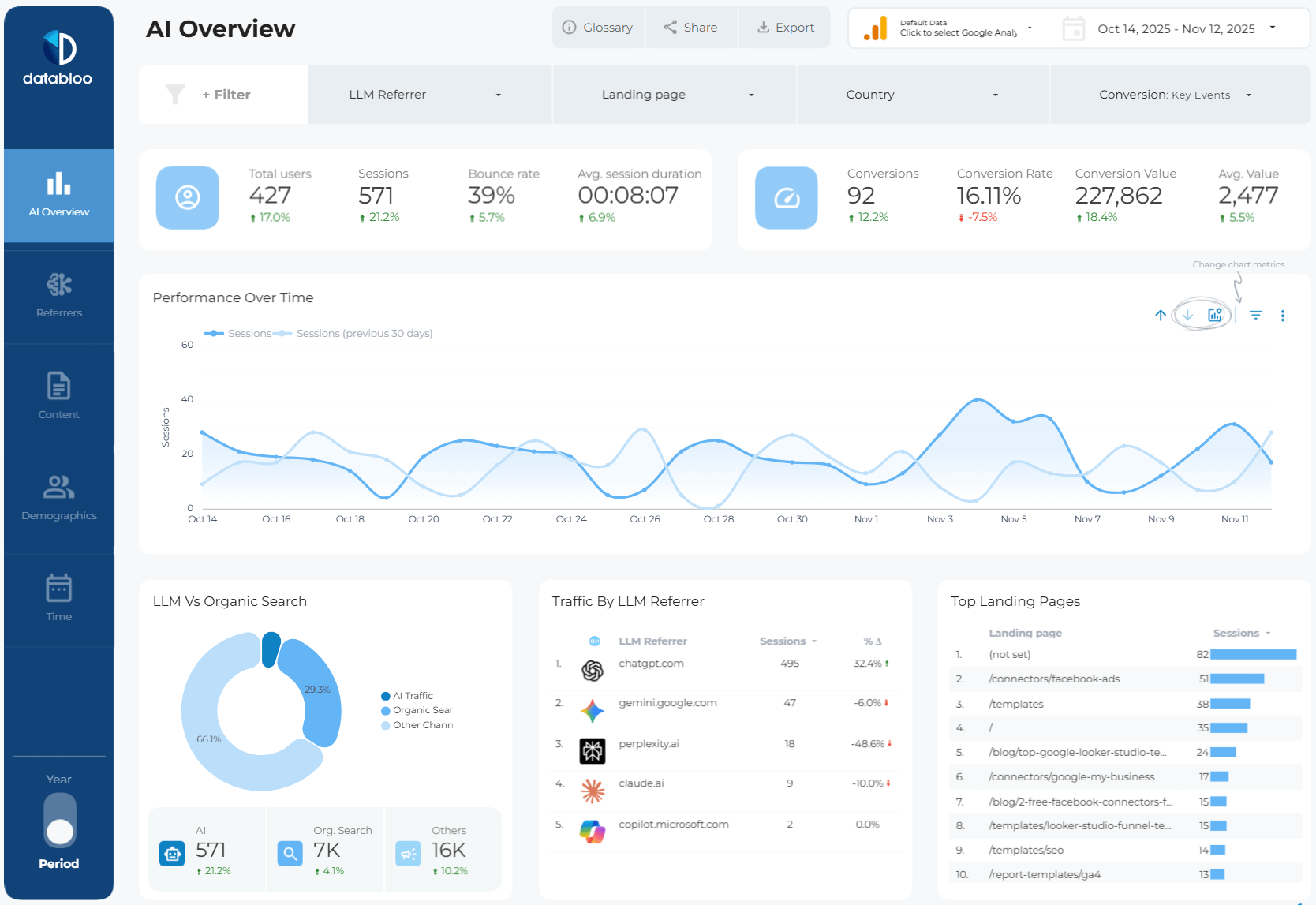
Image source: Data Bloo
When selecting or auditing a website theme, you must check for several technical pitfalls that commonly plague modern web design.
The JavaScript Link Problem
Many modern templates use JavaScript to create beautiful, animated buttons for calls-to-action (CTAs) or internal navigation. However, as documented in the Bubble.io developer forums, Googlebot often struggles to follow links that are hidden inside JavaScript workflows (`onclick` events).
To ensure your site architecture is crawled properly, your theme must use standard HTML anchor tags (<a href="url">) for all important links, even if they are styled to look like buttons using CSS.
The "Read More" Redundancy
A common layout issue, particularly noted in Joomla and WordPress community forums, occurs with "Category Blog" layouts. The theme displays the first paragraph of an article on the homepage with a "Read More" button. When the user clicks through, that same introductory paragraph is repeated at the top of the full article page.
This creates a poor user experience and can sometimes trigger minor duplicate content flags within your own site architecture. Ensure your CMS template is configured to handle the "intro text" break cleanly, transitioning smoothly into the main body content.
Essential Technical Theme Features
| Technical Feature | Why It Matters for SEO | How to Verify |
|---|---|---|
| Schema Markup (JSON-LD) | Enables rich snippets (stars, FAQs) in search results. | Google Rich Results Test tool. |
| Valid Breadcrumbs | Helps crawlers understand site depth and hierarchy. | Check Google Search Console for breadcrumb errors. |
| Auto-Alt Image Tags | Ensures accessibility and improves Google Image search visibility. | Inspect element on images to ensure `alt=""` is populated. |
| Mobile Responsiveness | Google uses mobile-first indexing; desktop-only sites will not rank. | Google Mobile-Friendly Test. |
Where to Place Your CTAs Based on User Intent
A blog post that ranks but doesn't convert is a vanity metric. The placement of your Calls-to-Action (CTAs) should be dictated by the search intent of the template you are using.
- For ToFu Content (Guides, Listicles): The reader is not ready to buy. Place a soft CTA, such as a newsletter sign-up or a downloadable PDF checklist, at the 50% scroll point of the article. Exit-intent popups also perform well here.
- For MoFu Content (Comparisons, Reviews): The reader is evaluating options. Place a comparison chart or an "Our Tool vs. Competitor" widget directly in the middle of the post where they are reading about features.
- For BoFu Content (Case Studies): The reader is ready to convert. Use sticky sidebars that follow the user as they scroll, or place a prominent "Book a Demo" button or discount code at the very bottom of the post.
Frequently Asked Questions
- How long should an SEO blog post be?
- Content length should be dictated by search intent, not an arbitrary word count. However, comprehensive guides typically range from 1,500 to 2,500 words to thoroughly cover a topic. Always analyze the top-ranking pages for your target keyword to gauge the expected depth.
- Can I use the same template for every post?
- No. Using a single template for every post will result in poor performance. You must match the template archetype (e.g., listicle, case study, how-to) to the specific search intent of the keyword you are targeting.
- Do I need a table of contents for every post?
- While not strictly mandatory for short news updates, a table of contents is highly recommended for any post over 1,000 words or any post containing more than three H2 headings. It improves user navigation and helps secure sitelink snippets in search results.
- What is a highly recommended SEO template for WordPress?
- When looking for a CMS theme, prioritize lightweight, fast-loading frameworks. Themes like GeneratePress, Astra, and Kadence are widely regarded as top-tier options because they output clean code and integrate seamlessly with schema markup plugins.
- How do I add schema markup to my blog template?
- If your CMS theme does not include native schema generation, you can add it using dedicated SEO plugins (like Yoast or RankMath for WordPress) or by manually injecting JSON-LD code into the header of your specific blog posts.
Final Thoughts: The 5-Minute SEO Audit
Ranking on page one is not about luck; it is about applying a systematized methodology to your content creation. By matching your writing structure to the user's search intent and ensuring your website's technical foundation is sound, you build a repeatable engine for organic growth.
- Validate before you write: Use the `intitle:` search modifier to ensure your target keyword has low enough competition to realistically rank.
- Match intent to archetype: Never use a listicle format for a query that requires a deep-dive, step-by-step tutorial.
- Enforce strict hierarchy: Ensure your document flows logically from a single H1, down to H2s, and into H3s without skipping levels.
- Hook readers instantly: Keep your introductions under 150 words and include your primary keyword early to satisfy skimmers.
- Audit your links: Verify that your CMS theme uses standard HTML anchor tags rather than JavaScript buttons for critical navigation.
- Align your CTAs: Place soft conversions (newsletters) in informational posts, and hard conversions (demos/sales) in transactional posts.