What Is a Script Outline and Why Should You Use One?
In the world of professional screenwriting, an outline is often described as the "blueprint" or "story map" for a narrative skyscraper. Just as an architect would never begin construction on a high-rise without detailed schematics, a screenwriter benefits significantly from organizing their thoughts before diving into a 100-page manuscript. According to industry standards, an outline serves as the foundational layer that supports the weight of your characters, themes, and plot twists [2].
The primary reason to use a script outline template is efficiency. It is significantly easier to delete a single line in a bulleted list than it is to cut a fully polished, ten-page sequence in a screenwriting software like Final Draft. By identifying structural issues early, you save yourself months of potential rewrites. As noted by many professional writers, the outline is the "objective" phase of the process where "killing your darlings" is relatively painless [2].
One of the most effective ways to ensure your outline remains engaging is the "Therefore/But" rule, popularized by Trey Parker and Matt Stone, the creators of South Park. They suggest that every scene in your outline should be connected by either the word "therefore" or the word "but." If your scenes are connected by "and then," your plot is likely episodic and lacks momentum. This cause-and-effect logic is a hallmark of strong storytelling [3].
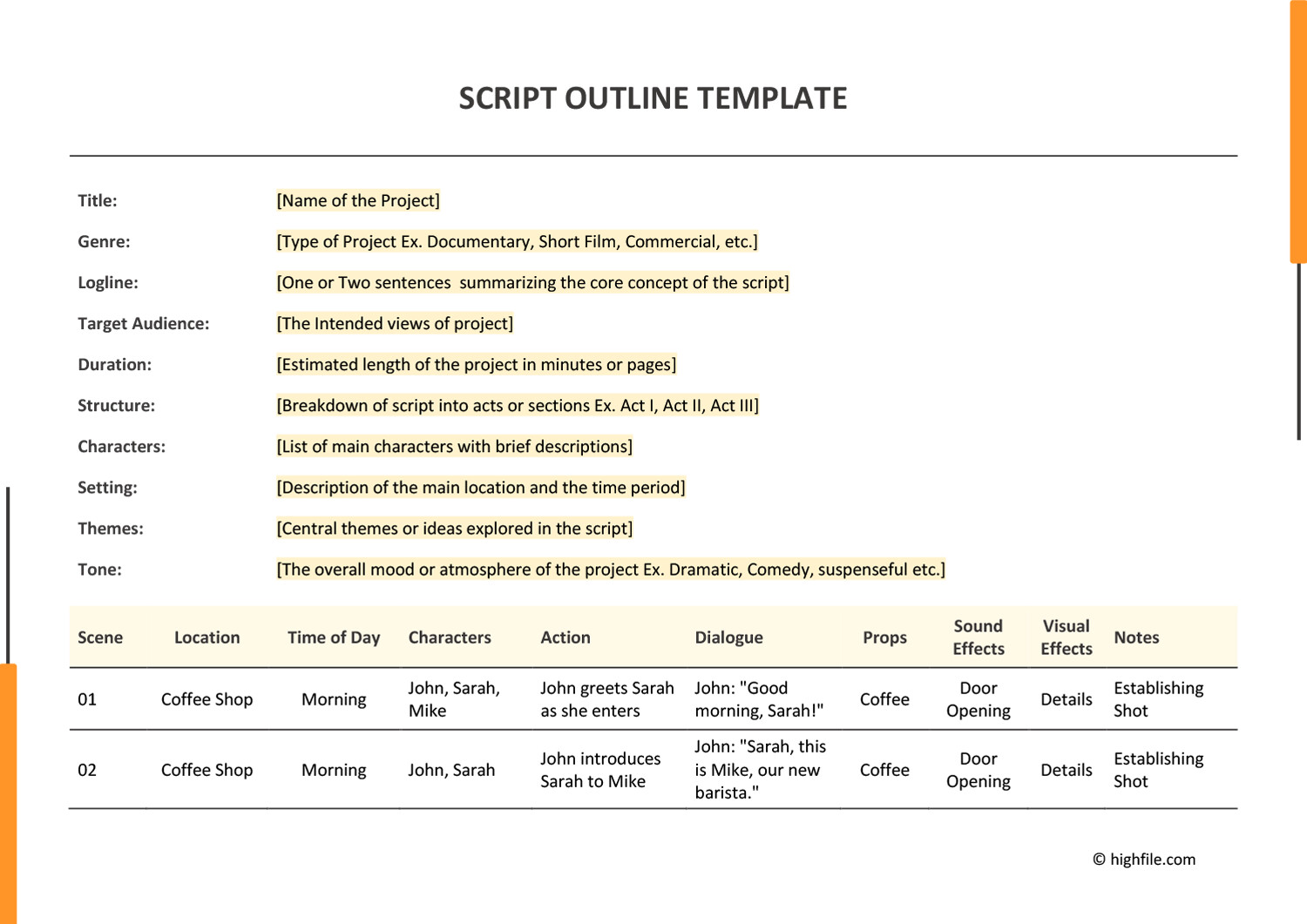
Image source: Highfile
Download Your Free Script Outline Templates
For many writers, the hardest part of starting is the formatting. While professional screenwriting software exists, many creators prefer the flexibility of standard word processors during the brainstorming and outlining phase. Below are several options tailored to different writing workflows.
Industry-standard layout for offline writing.
Download .docxCloud-based template with pre-set Styles.
Open TemplateDatabase-driven for complex world-building.
Duplicate PagePrintable 3-act structure cheat sheet.
Download PDFEach of these templates is designed to help you move from a vague idea to a structured beat sheet. The Google Docs version is particularly popular because it allows for real-time collaboration with writing partners or editors. By using "Heading Styles," you can create an automatic table of contents that acts as a clickable navigation bar for your story [4].
Which Outlining Method Is Right for Your Story?
Not every story fits the same mold. A high-octane action thriller requires a different structural density than a slow-burn character study. Choosing the right framework is essential for maintaining the correct pacing. Below is a comparison of the most widely used outlining methods in the industry.
| Method | Focus | Best For... |
|---|---|---|
| 3-Act Structure | Beginning, Middle, End | Beginners and standard feature films. |
| Save the Cat (15 Beats) | Commercial Pacing | Genre films and formulaic storytelling. |
| The Story Map (14 Beats) | Character Journey | Emotional, character-driven narratives. |
| 40-Beat Technique | Sequence Density | Complex features needing high structural detail. |
If you are writing a 10-minute short film, a simple 3-act structure is usually sufficient. However, for a 90-120 minute feature film, many writers find that the 40-beat technique provides the necessary granularity to avoid the "saggy middle" that plagues many scripts. The goal is to choose a method that supports your creative process rather than one that feels like a prison.
How to Build Your Script Outline Using the Pizza Dough Method
The "Pizza Dough" method, often discussed in writing communities, is a variation of the Snowflake Method. It involves taking a small idea and "stretching" it gradually until it covers the entire narrative space. This prevents "structural shock," where a writer tries to jump from a one-sentence idea to a full script too quickly.
Start with a 1-2 sentence description of your story. Don't worry about making it perfect; just anchor the central conflict. For example: "A retired detective must find a kidnapped child before the storm hits."
Step 2: The Stretch. Copy and paste that logline and expand it into a one-page synopsis. Focus on the major turning points: How does it start? What is the midpoint? How does it end? At this stage, you are looking for the "bones" of the story.
Step 3: The Sequence Breakdown. Expand the synopsis into roughly 40 sequences. A sequence is a group of 3-4 scenes that share a common goal or location. By focusing on sequences rather than individual scenes, the task of writing a feature film becomes much more manageable. Instead of 100+ scenes, you only have to worry about 40 major movements [9].
Step 4: The Beat Sheet. Finally, add specific "Therefore/But" logic to every sequence transition. This ensures that every part of your story is connected by cause and effect. If a sequence doesn't lead to the next one through a logical consequence or a new obstacle, it may be filler that needs to be cut.
How to Use the 40-Beat Sequence Strategy for Feature Films
The 40-beat strategy is widely considered one of the most practical approaches for feature-length screenplays. In a standard 100-page script, 40 beats equates to roughly one beat every 2.5 pages. This density ensures that the story moves at a brisk pace without feeling rushed.
When using this method, you typically divide the beats across the three acts:
- Act I (Beats 1-10): Setup, Inciting Incident, and the decision to take action.
- Act IIa (Beats 11-20): The "Fun and Games" section leading up to the Midpoint.
- Act IIb (Beats 21-30): Rising stakes, the "All is Lost" moment, and the "Dark Night of the Soul."
- Act III (Beats 31-40): The Climax, Resolution, and the final image of the new world.
Focusing on sequences rather than individual scenes keeps the workflow manageable. A sequence might be "The Heist Preparation" or "The First Date." By treating these as single units in your outline, you can maintain a high-level view of the story's pacing [9].
How to Format Your Outline in Google Docs Without Special Software
You don't need expensive software like Final Draft or Movie Magic Screenwriter to create a professional outline. Google Docs offers a powerful feature called "Styles" that can automate your formatting and navigation.
To set this up, use the following "Style Map":
- Heading 1 (Sluglines)
- Use this for your scene headings (e.g., INT. COFFEE SHOP - DAY). Set the font to Courier New, 12pt, All Caps.
- Heading 2 (Character Names)
- Use this for character names before dialogue. Center the text and use All Caps.
- Normal Text (Action and Dialogue)
- Use standard Courier New, 12pt. You can adjust the margins for dialogue to make it look more like a traditional script.
The real power of this method lies in the Document Outline view. By using Heading 1 for your sequences or scenes, Google Docs automatically generates a clickable list on the left side of your screen. This allows you to jump between Act I and Act III instantly, which is a significant advancement over scrolling through a 50-page document [4].
Character-Driven Outlining to Avoid Formulaic Plots
A common criticism of beat-based templates like Save the Cat is that they can lead to formulaic, predictable stories. To avoid this, many writers integrate a "Character Questionnaire" into their outlining process. Instead of asking "What happens next?", ask "How does my character react to this obstacle based on their specific flaws?"
Consider these five questions for your protagonist during the outlining phase:
- How do they handle money or scarcity?
- What is their relationship with food or physical comfort?
- What is the one secret they would never tell a stranger?
- How do they react when they are told "no"?
- What is their greatest fear, and how does the plot force them to face it?
When you allow character flaws to "generate" the obstacles in your outline, the plot feels organic rather than forced. This prevents the story from feeling like a series of checkboxes and instead makes it feel like a living, breathing journey. As noted by story consultants, the best outlines are those where the plot is simply the outward manifestation of the character's internal struggle.
Common Mistakes That Ruin a Script Outline
Even with a top-tier template, it is easy to fall into traps that can weaken your story. Awareness of these common errors can save you significant time during the writing phase.
Over-Engineering: One of the most frequent mistakes is trying to plan every single word and gesture in the outline. This can kill spontaneity and make the actual writing process feel like a chore. Leave room for your characters to surprise you once you start writing dialogue.
The "And Then" Trap: As mentioned earlier, if your outline reads like a list of disconnected events ("They go to the store, and then they meet a friend, and then they go home"), the audience will lose interest. Every beat must be a consequence of the one before it.
Emotional Attachment: Writers often struggle to cut a "darling" scene—a sequence they love that doesn't actually serve the story. The outline is the time to be ruthless. If a scene doesn't move the plot forward or reveal character, it ranks among the first things that should be removed.
"The outline is the place where you can fail safely. It is much better to realize your ending doesn't work when it's a bullet point than when it's page 110 of a finished draft."
Frequently Asked Questions
How many pages should a script outline be?
For a standard feature film (90-120 pages), a script outline is typically between 5 and 15 pages. A shorter outline might lack the necessary detail to guide you through the "saggy middle," while an outline longer than 20 pages might be over-engineered and stifle your creativity during the actual writing process.
What is the difference between a treatment and an outline?
A treatment is usually written in prose and reads like a short story, focusing on the narrative flow and emotional beats. An outline is more technical and structural, often using bullet points or beat sheets to map out specific scenes, sequences, and transitions. Many writers create an outline first and then expand it into a treatment for producers.
Can I use these templates for YouTube or TikTok scripts?
Yes, though the scale is different. For short-form content, you might only use a 3-beat or 5-beat outline. The 3-Act Structure (Hook, Value, Call to Action) is exceptionally strong for engagement on social media platforms. The core principles of cause-and-effect still apply regardless of the video's length.
Do I need Final Draft to create a professional outline?
No. While Final Draft is a top choice for formatting the final script, many professional writers prefer using "low-friction" tools like Google Docs, Notion, or even physical index cards for the outlining phase. The goal is to get ideas down quickly without worrying about industry-standard margins and sluglines.
What exactly is a "Beat" in screenwriting?
A "beat" is the smallest unit of story. It can represent a specific action, a shift in emotional tone, or a new piece of information revealed to the character or audience. In an outline, a beat usually corresponds to a single scene or a significant turning point within a sequence.
Key Takeaways for Successful Outlining
Outlining is not a prison; it is a map. While you may choose to take a detour during the writing process, having a destination in mind ensures you don't get lost in the wilderness of Act II.
- Start with a logline to anchor your story's central conflict before expanding.
- Choose a framework (like the 40-beat method) that matches the complexity of your project.
- Use the "Therefore/But" rule to ensure every scene has a cause-and-effect relationship.
- Leverage "Styles" in Google Docs to create a clickable navigation bar for your document.
- Focus on sequences rather than individual scenes to keep the outlining process manageable.
- Integrate character flaws into your plot beats to avoid a formulaic or predictable story.
- Be ruthless in the outline phase; it is the easiest time to cut scenes that don't serve the narrative.
Download one of the templates above and try mapping out your next three sequences today to see how much faster your writing process becomes.