How to Format an Official Air Force Memorandum Template
Need a compliant file immediately? Download the official templates below. All Department of the Air Force (DAF) memorandums must adhere to the formatting rules outlined in AFH 33-337 (The Tongue and Quill) and AFMAN 33-326. The standard requirements include 1-inch margins, 10 to 12-point font (Times New Roman or Arial), and a specific 5-line spacing for the signature block.
Writing an official Air Force memorandum can be a frustrating experience, especially when Microsoft Word formatting breaks or a document gets kicked back by the Commander's Support Staff (CSS) for a minor spacing error. Whether you are drafting a policy letter, a Memorandum for Record (MFR), or routing an indorsement up the chain of command, strict adherence to established standards is required.
This guide provides a comprehensive breakdown of the formatting rules, common pitfalls to avoid, and advanced troubleshooting techniques to ensure your correspondence meets the rigorous standards of the Department of the Air Force.
Which Air Force Memorandum Format Do You Actually Need?
Before you begin typing, it is crucial to select the correct format for your specific communication need. The Air Force utilizes several distinct types of memorandums, each serving a unique administrative purpose. Choosing the wrong format is one of the most common reasons documents are returned for correction.
- The Official Memorandum
- This is the standard format used for formal communication between units, wings, MAJCOMs, or external agencies. It requires official letterhead (either printed or computer-generated) and strict adherence to the "FROM," "MEMO FOR," and "SUBJECT" block formatting. It is the primary vehicle for policy letters, official requests, and formal directives.
- The Memorandum for Record (MFR)
- The MFR is utilized to document internal events, phone calls, meeting minutes, or decisions for the historical file. It is generally less formal than an Official Memorandum and is often used to establish a paper trail. MFRs can be written on plain bond paper rather than official letterhead.
- The Indorsement
- An indorsement is used to add comments, recommendations, or approvals to an existing memorandum as it moves through the chain of command. Instead of writing a completely new memo, the reviewing authority adds their indorsement (e.g., "1st Ind," "2nd Ind") directly below the original text or on a subsequent page.
- The Short Note Reply
- A highly efficient method for internal squadron business. A commander or supervisor can handwrite or type a brief reply directly on the original memorandum, sign it, and return it. This saves administrative time when a formal indorsement is unnecessary.
| Memo Type | Primary Purpose | Typical Audience | Key Formatting Difference |
|---|---|---|---|
| Official Memo | Formal directives, policies, requests | External units, higher headquarters | Requires official letterhead and full 9-digit ZIP code. |
| MFR | Documenting events, phone calls, files | Internal files, unit personnel | Often uses plain paper; focuses on recording facts. |
| Indorsement | Routing for approval or comment | Chain of command | Appended to an existing memo; uses specific numbering. |
How to Follow the Tongue and Quill Formatting Standards
The definitive authority for all Air Force and Space Force communications is AFH 33-337, commonly known as The Tongue and Quill. While this handbook provides the "how-to" guidance, the mandatory regulatory requirements are codified in AFMAN 33-326, Preparing Official Communications. Adhering to these standards is not optional for official correspondence.
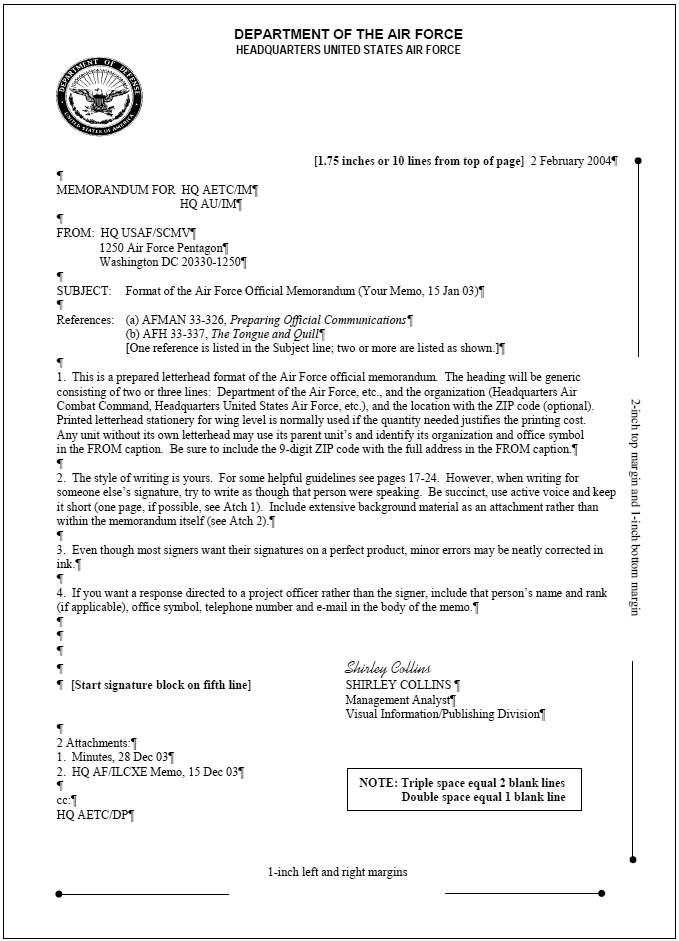
Image source: Air Force Writer
Font, Ink, and Margin Requirements
The visual presentation of a memorandum must be clean and professional. The regulations mandate the following baseline settings:
- Font Size and Style: Use 10 to 12-point font. Times New Roman is the traditional standard, though Arial is widely accepted and often preferred for digital readability. Do not use decorative or condensed fonts.
- Margins: Standard 1-inch margins are required on the left, right, and bottom of the page. The top margin varies slightly depending on whether you are using pre-printed letterhead or computer-generated letterhead, but the text body generally begins 1 inch below the header elements.
- Ink: If the document requires a physical "wet" signature, you must use black or blue-black ink. Other colors are strictly prohibited for official signatures.
The 9-Digit ZIP Code Requirement
A frequently overlooked detail that results in administrative kick-backs is the ZIP code in the "FROM" block. According to the DAF Official Memorandum Template guidance, the "FROM" line must include the organization's full street address and the complete 9-digit ZIP code (ZIP+4). A standard 5-digit ZIP code is considered incomplete for formal letterhead.
How to Format the Header and "MEMO FOR" Lines
The top portion of the memorandum establishes the context, the sender, and the recipient. Precision in this section is critical for proper routing and historical archiving.
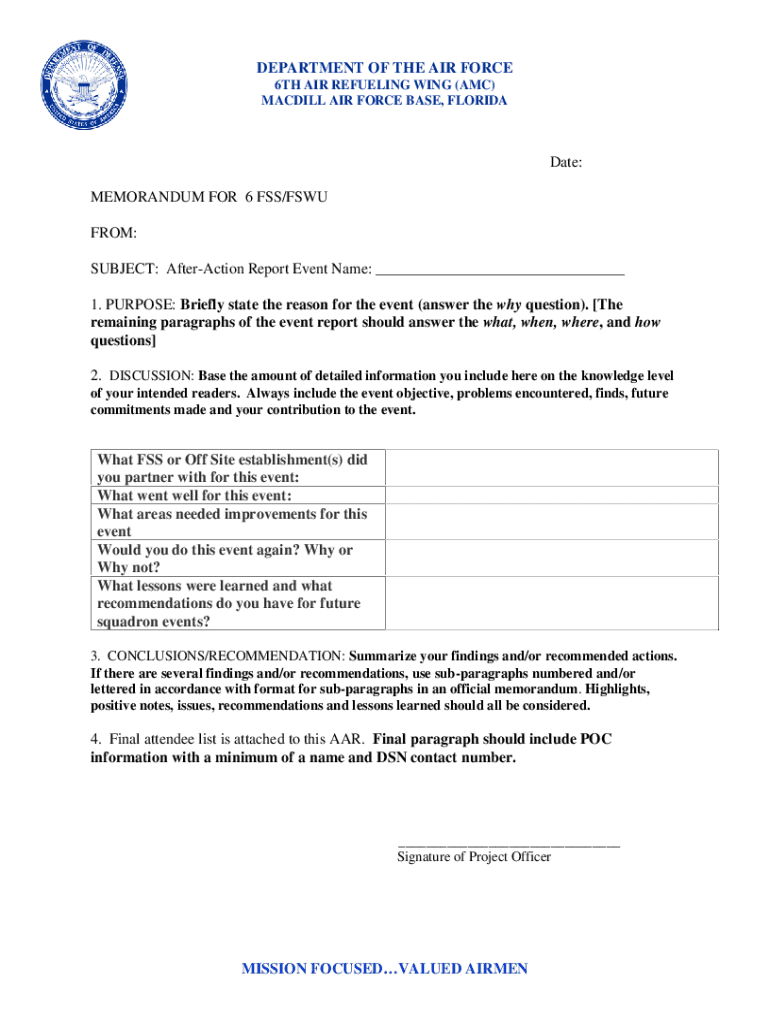
Image source: DocHub
The Organization Header
Modern memorandums typically use computer-generated letterhead. This header must be centered and include the Department of the Air Force seal (or the specific MAJCOM/Wing emblem if authorized by local supplement). The text should clearly state "DEPARTMENT OF THE AIR FORCE" followed by the specific unit designation.
The "FROM" and "MEMO FOR" Elements
The routing elements follow a strict vertical alignment:
- MEMO FOR: This line identifies the recipient. It is placed flush with the left margin. If the memo is being routed through multiple offices before reaching its final destination, you may use the "IN TURN" format (e.g.,
MEMO FOR SG IN TURN). - FROM: Placed directly below the MEMO FOR line. It must include the sender's office symbol and the full mailing address (including the aforementioned 9-digit ZIP code).
- SUBJECT: The subject line must be typed in ALL CAPS. It should be brief but highly descriptive of the memo's content. Avoid vague subjects like "UPDATE" or "REQUEST." Instead, use specific identifiers like "SUBJECT: REQUEST FOR EXCEPTION TO POLICY - TSGT JOHN DOE."
The Front Office Survival Guide to Avoiding Kick-Backs
Executive Officers (Execs) and Commander's Support Staff (CSS) personnel are trained to spot formatting errors instantly. A memo with poor formatting reflects poorly on the sender's attention to detail. To ensure your document survives the front office review process, you must master these specific rules.
Pro Tip: Always check your Wing or MAJCOM "Writing Guide" before submitting a memo. Many commands publish local supplements that override general Tongue and Quill guidance regarding specific letterhead usage, signature block titles, or routing procedures.
The Two-Line Rule (Widows and Orphans)
This is arguably the most common formatting error in military writing. The "Two-Line Rule" dictates how paragraphs must break across pages:
- You cannot leave a single line of a paragraph at the bottom of a page (an "orphan"). If a paragraph starts near the bottom of page one, at least two lines of that paragraph must fit on page one.
- You cannot carry a single line of a paragraph over to the top of the next page (a "widow"). If a paragraph breaks across pages, at least two lines must carry over to the top of page two.
If your text violates this rule, you must adjust your line spacing, edit the text for brevity, or force the entire paragraph to the next page.
The 3rd Character Rule for Civilian Signatures
Signature block alignment varies slightly between military members and Department of the Air Force (DAF) civilians. For military members, the second line (Rank, USAF) is typically centered under the name or aligned flush left with the name, depending on the specific block style chosen.
However, for DAF civilians, a highly specific rule applies: the second line of the signature block (the duty title) must align with the third character of the first line (the name). Failing to indent the civilian duty title to this exact specification is a guaranteed kick-back at higher headquarters levels.
The "Page Alone" Rule
Never place a signature block on a page by itself. The signature block must be accompanied by at least two lines of the body text. If your memo ends perfectly at the bottom of page one, but the signature block is forced to page two, you must adjust the margins or edit the body text to pull at least two lines of the final paragraph onto page two alongside the signature.
How to Fix Broken Formatting in Microsoft Word
When users download the official .dotx template and begin pasting text from other documents, the delicate formatting often shatters. Fonts change, line spacing doubles, and the signature block gets pushed off the page. The solution lies in mastering Microsoft Word's "Styles Pane."
Using the Styles Pane (Power-User Technique)
The official Air Force templates are built using predefined Word Styles. When you paste text, you often bring in conflicting styles from the source document. To fix this:
- Press
Alt + Ctrl + Shift + Son your keyboard. This opens the Styles Pane on the right side of your screen. - Highlight the text that is formatted incorrectly.
- In the Styles Pane, click on the style named "Body Text" or "AF Body" (depending on the template version). This will instantly force the highlighted text to conform to the correct font, size, and paragraph spacing required by the Tongue and Quill.
Fixing Signature Block Spacing
The signature block should begin exactly on the 5th line below the last line of text (or the 3rd line below the "Attachments" element, if applicable). Word's default settings often add extra "space after paragraph," which makes the 5-line gap too large.
To correct this, highlight the blank lines above the signature block, navigate to the "Layout" tab, and ensure the "Spacing After" setting is set to 0 pt. Then, simply press Enter five times from the end of the text to create the correct physical space for the signature.
How to Handle Digital and CAC Signatures
With the transition to digital workflows, most official memorandums are now signed using a Common Access Card (CAC). While this streamlines the routing process, it introduces new formatting considerations.
Placing the Digital Signature Box
When applying a digital signature in Adobe Acrobat or Word, you must draw the signature box carefully. The digital signature block should be placed within the 5-line gap created above the printed name. It must not overlap or obscure the printed name, rank, or duty title. A top-tier approach is to draw the box so its bottom edge rests just above the first letter of the printed name.
Timestamp Requirements and the Date Line
A CAC signature automatically generates a cryptographic timestamp (e.g., Digitally signed by DOE.JOHN.1234567890 Date: 2026.06.30 14:30:00 -05'00'). Because this timestamp serves as the official record of when the document was executed, many units no longer require a manually typed date in the header of the memo if it is being digitally signed. However, you should verify this with your local CSS, as some commands still prefer the date line to be filled out manually prior to signing.
How to Write an Indorsement on an Air Force Memo
When a memorandum requires review or approval from multiple levels of command, you do not write a new memo at each level. Instead, you use an indorsement. This creates a continuous, single-document record of the decision-making process.
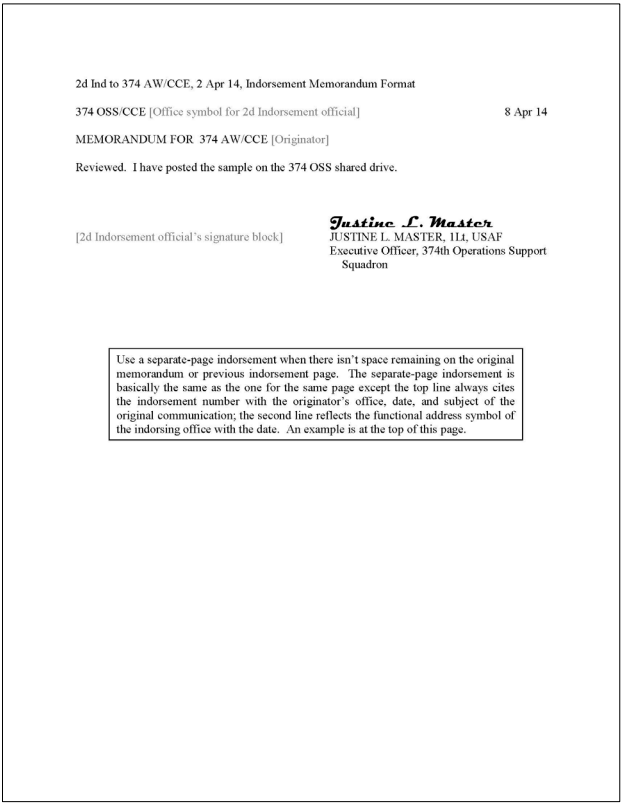
Image source: Humanities LibreTexts
Sequencing and Placement Rules
Indorsements are numbered sequentially. The first office to add an indorsement writes "1st Ind," the second writes "2nd Ind," and so forth. The formatting follows strict rules:
- Placement: The indorsement begins on the same page as the original memo (or the previous indorsement) if space permits. You must leave a space of 3 to 5 blank lines between the last element of the previous text and the start of the new indorsement.
- Office Symbol and Date: The office symbol of the indorsing unit and the date are placed on the same line as the indorsement number (e.g.,
1st Ind, 12 ABW/CC 30 Jun 26). - MEMO FOR: The next line indicates who the indorsement is being routed to (e.g.,
MEMO FOR AFPC/DP2).
If an indorsement must start on a new page, it requires a partial heading at the top of the new page that references the original memo's date and subject, ensuring the detached page can be linked back to the original document.
Quick Copy-Paste Blocks for Restricted Networks
If you are working on a restricted network (such as SIPRNet) or a terminal where downloading .dotx files is blocked, you can use these plain-text templates to manually build a compliant memo in a blank Word document.
Plain Text Header Layout
[Center the following 3 lines, 1-inch from top]
DEPARTMENT OF THE AIR FORCE
HEADQUARTERS 12TH FLYING TRAINING WING (AETC)
JOINT BASE SAN ANTONIO-RANDOLPH TEXAS

[Flush Left, 2 lines below header]
MEMO FOR  [RECIPIENT OFFICE SYMBOL]

FROM:  [YOUR OFFICE SYMBOL]
       [Full Street Address]
       [City, State, 9-Digit ZIP Code]

SUBJECT:  [SUBJECT IN ALL CAPS]

1. [Begin body text here, 2 lines below SUBJECT...]
Standard Military Signature Block
[5 blank lines below the last line of text]


                                      FIRST M. LAST, Rank, USAF
                                      Duty Title
Frequently Asked Questions
Can I use "I" or "me" in an Air Force memo?
What is the difference between AFH 33-337 and AFMAN 33-326?
Do I need a 9-digit ZIP code for internal squadron memos?
How many spaces go after a period in an AF memo?
What font size is required for Air Force memos?
Final Checklist for a Compliant Air Force Memorandum
Before routing your document to the Commander's Support Staff or your Executive Officer, verify that your memo meets these critical formatting standards to prevent unnecessary delays.
- Verify that your document utilizes standard 1-inch margins on the left, right, and bottom, with a 10 to 12-point approved font (Times New Roman or Arial).
- Check for the "Two-Line Rule" to ensure no single lines of a paragraph are orphaned at the bottom of a page or widowed at the top of the next.
- Ensure the SUBJECT line is typed entirely in ALL CAPS and accurately reflects the content of the memo.
- Confirm that the "FROM" block includes the complete 9-digit ZIP code (ZIP+4) for your organization.
- Align civilian signature blocks precisely, ensuring the second line (duty title) starts under the 3rd character of the printed name.
- Count the spacing above the signature block to ensure it begins exactly on the 5th line below the final text element.