How to Find and Design Top Church Bulletin Templates for Your Service
Finding a reliable church bulletin template depends entirely on your staff's technical skills and your printing setup. For highly visual, modern designs, Canva ranks among the top free options. For traditional, text-heavy liturgies that require precise folding, Microsoft Word and Publisher remain industry standards. As of 2026, the most effective strategy is the Hybrid Workflow—printing a streamlined physical shell while using QR codes to direct visitors to digital sermon notes and event registrations.
Every Saturday evening, thousands of church administrators and volunteers find themselves wrestling with margins, pixelated logos, and overflowing text boxes. The weekly church bulletin is a critical piece of communication, serving as a roadmap for first-time visitors and a community hub for regular attendees. However, designing it from scratch every week is a recipe for burnout.
Whether you are leading a modern church plant meeting in a high school gymnasium or managing communications for a historic parish with multiple weekend masses, utilizing pre-formatted templates can save hours of frustration. This guide explores where to find high-quality templates, how to choose the right software ecosystem, and how to implement modern design frameworks to ensure your congregation actually reads what you print.
Where to Download Free Church Bulletin Templates Today
The landscape of free design resources has expanded significantly. Rather than relying on outdated clip-art layouts, modern church communicators have access to professional-grade templates across multiple platforms. Choosing the right source depends on your "Church Personality"—whether you lean toward highly visual modernism or structured, traditional liturgy.
Canva Beginner
Canva has become a dominant force in church communications due to its intuitive drag-and-drop interface. The platform offers hundreds of free church program templates that are highly visual and easy to customize. It is an excellent choice for modern church plants that prioritize photography and clean typography over dense paragraphs of text. Because it is cloud-based, multiple volunteers can collaborate on the design simultaneously.
Warner Press Intermediate
For churches that purchase pre-printed bulletin "shells" (paper that already has a full-color cover design), formatting the inside text to align perfectly is a common challenge. Warner Press offers the "My Church Toolbox," which includes over 200 specific Word templates mapped to their SKUs. This ensures your text won't print over the pre-existing artwork.
LPi (Catholic/Parish) Beginner
Catholic parishes and liturgical churches often have unique needs, such as listing multiple mass times, confession schedules, and extensive diocesan announcements. LPi provides specialized Canva Pro bulletin templates specifically tailored for parish life, offering layouts that accommodate dense information without looking cluttered.
TemplateLab Intermediate
If your church operates on a strict budget and prints entirely in-house on standard 8.5" x 11" paper, TemplateLab offers a collection of basic, no-frills layouts for Microsoft Word. These are highly functional, text-focused templates that work well for smaller congregations that do not require complex graphic design.
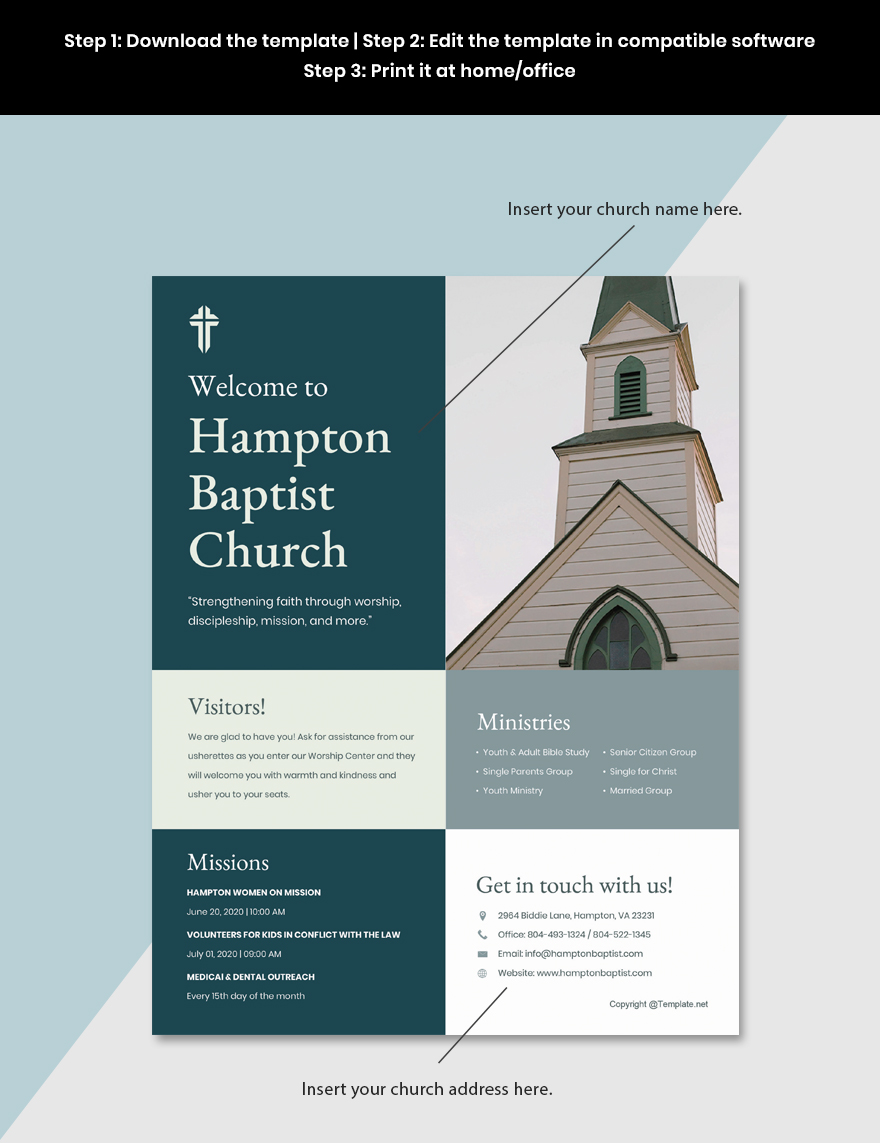
Image source: Template.net
How to Choose the Right Software for Your Church Staff
A common mistake church leaders make is selecting a template based purely on aesthetics, only to realize their volunteer team doesn't know how to use the required software. The tool you choose must match the technical proficiency of the people updating it every week.
| Feature | Canva (Web-based) | Microsoft Word | Microsoft Publisher |
|---|---|---|---|
| Best For | Highly visual, modern designs | Text-heavy, traditional bulletins | Precise printing and complex folds |
| Learning Curve | Very Low (Drag & Drop) | Low (Widely familiar) | Medium (Requires layout knowledge) |
| Offline Access | No (Requires internet) | Yes | Yes |
| Print Precision | Moderate (Can be tricky to align folds) | Moderate (Margins can shift) | High (Built for print-shop quality) |
The Case for Microsoft Publisher in 2026
While cloud-based tools get most of the attention, Microsoft Publisher remains a highly capable tool for print-specific tasks. As demonstrated in recent Publisher 2025/2026 tutorials, the software excels at handling complex document structures like tri-folds and legal-size paper. Unlike Word, which treats text as a continuous flow, Publisher treats every text box and image as an independent object. This prevents the dreaded "one extra line of text pushes the entire document onto a new page" scenario. If your church prints complex, multi-page booklets, Publisher is widely regarded as a more stable environment than Word.
Use the S.A.I.N.T. Method to Audit Your Bulletin Design
Even with a great template, it is easy to overcrowd the page. According to Concordia Supply, a leading provider of church materials, effective bulletin design follows a specific framework. Before finalizing your weekly print, run your layout through the S.A.I.N.T. method to ensure readability.
- Simplicity: Keep text concise. Avoid the "wall of text" syndrome. If an announcement requires more than three sentences, summarize it and use a QR code to link to the full details on your website.
- Absolutes: Utilize high contrast in size and color. Your headlines should be undeniably distinct from your body text. If everything is bolded, nothing stands out.
- Importance: Establish a clear visual hierarchy. The most critical information—such as service times, location, and childcare details—should be positioned where the eye naturally falls first (typically the top left or center).
- Neatness: Group related sections together. Place all youth group events in one designated box, and all financial updates in another. Use ample "white space" (empty space) to give the reader's eyes a rest.
- Type and Images: Limit your design to a maximum of two font families (e.g., one serif for headings, one sans-serif for body text). Ensure any photos used reflect your actual congregation rather than relying entirely on generic stock imagery.
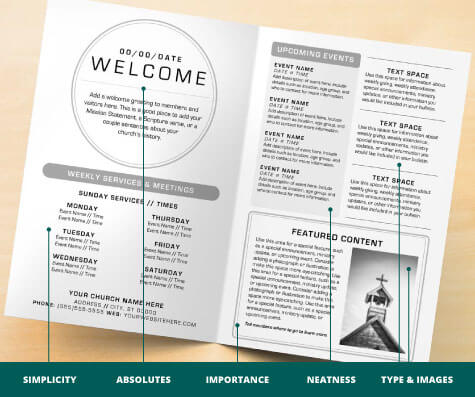
Image source: Concordia Supply
How to Select the Right Size and Fold for Your Service
The physical dimensions of your bulletin dictate how much information you can share and how it feels in the hands of a visitor. Standardizing your size also ensures compatibility with bulk paper suppliers.
Standard 8.5" x 11" (Bi-fold)
This is the most common and cost-effective format. A standard letter-sized sheet folded in half creates a four-page booklet (Cover, Inside Left, Inside Right, Back). It provides enough space for a standard order of service, a few announcements, and sermon notes. It is highly recommended for weekly use due to its simplicity and low printing cost.
Legal 8.5" x 14" (Tri-fold)
Churches with extensive liturgical orders, multiple choirs, or lengthy prayer lists often find the standard bi-fold too restrictive. Upgrading to legal-size paper and using a tri-fold layout provides six distinct panels of information. This format is excellent for categorizing information (e.g., dedicating one entire panel to youth ministry and another to global missions).
The Specialized Five-Page Flap
During high-attendance seasons like Easter, Christmas, or Mother's Day, churches often have an influx of visitors and a massive list of upcoming events. The "five-page flap" involves a standard bi-fold with an additional half-sheet insert stapled or tucked into the center. This allows you to keep your standard template intact while adding temporary, high-density information for that specific week.
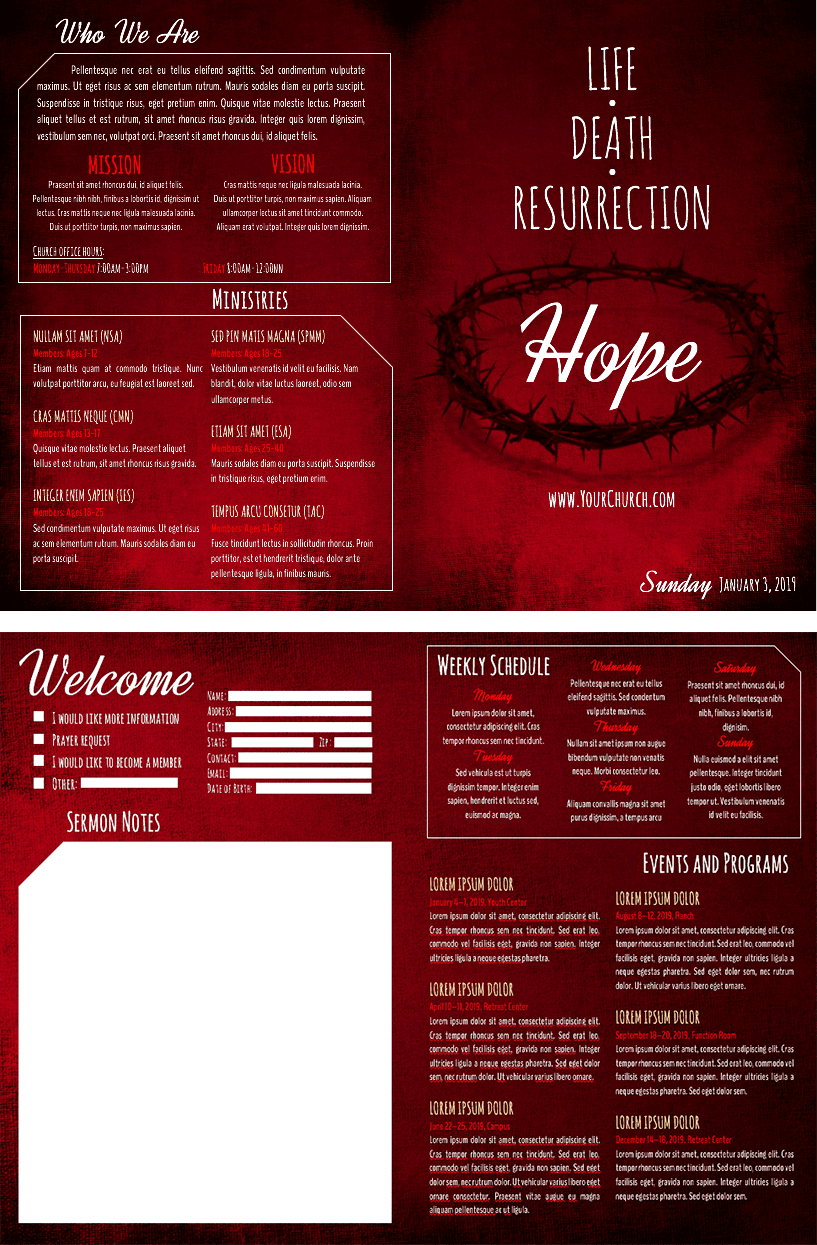
Image source: Church Tech Today
What Every Visitor-Friendly Church Bulletin Must Include
A church bulletin serves two distinct audiences: the regular attendee looking for schedule updates, and the first-time visitor trying to understand the culture of the church. Many churches make the mistake of designing exclusively for the regulars. To create a "Visitor Roadmap," your template should include these essential sections:
1. The Welcome Message
A brief, warm paragraph explicitly addressing newcomers. Let them know you are glad they are there and explain what they can expect during the service.
2. Order of Service
Demystify the liturgy. List the sequence of events (songs, prayers, sermon, communion) so visitors aren't caught off guard by sudden standing or sitting.
3. "Next Steps"
Provide a clear, low-pressure way to get involved. This could be an invitation to a newcomer's lunch, a small group sign-up, or a simple "Text WELCOME to 55555."
4. Sermon Notes
Include a dedicated space with fill-in-the-blank outlines or simply blank lines to encourage active engagement with the message.
Additionally, ensure your template has dedicated space for Scripture References, Song Lyrics (or hymnal page numbers), a Prayer Request Form (often designed as a tear-off flap), clear Contact Information, and transparent Giving/Tithing Instructions. Modern templates, like those found on MyCreativeShop, often pre-build these sections into their layouts.
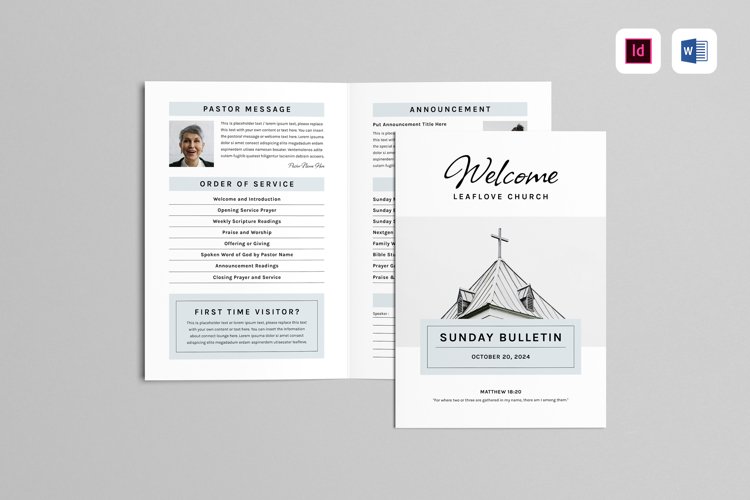
Image source: Design Bundles
How to Create a Hybrid Bulletin with QR Codes and Digital Links
As of 2026, the debate between "paper vs. digital" has largely settled on a compromise: the Hybrid Bulletin. Printing full, multi-page booklets for every attendee is expensive and environmentally taxing. Conversely, forcing everyone to use a mobile app alienates older congregants and those who prefer a tactile experience.
Bridging the Gap with QR Codes
The hybrid approach involves printing a streamlined, single-page (or bi-fold) physical bulletin that contains the core essentials: the order of service, the welcome message, and the primary announcements. Next to secondary information, you place scannable QR codes. For example, instead of printing a 500-word update on a recent mission trip, print a compelling photo, a two-sentence summary, and a QR code labeled "Read the full story and see photos here."
Interactive Sermon Notes
Instead of just providing blank lines on paper, modern templates incorporate QR codes that link directly to digital platforms. Congregants can scan the code to access mobile-friendly, fill-in-the-blank sermon notes. Some churches take this a step further by linking to live polling software or digital Q&A forms, allowing the congregation to submit questions to the pastor in real-time during the message.
The Digital Flipbook Alternative
For churches looking to reduce printing costs dramatically, creating a digital flipbook is a strong option. Tools like FlippingBook allow you to upload your PDF bulletin and convert it into an interactive, page-turning digital document. The major advantage here is editability; if you spot a typo in the pastor's name on Sunday morning, you can update the digital file instantly without reprinting hundreds of paper copies. Moving even 50% of your congregation to a digital format can save thousands of dollars in annual toner and paper costs.
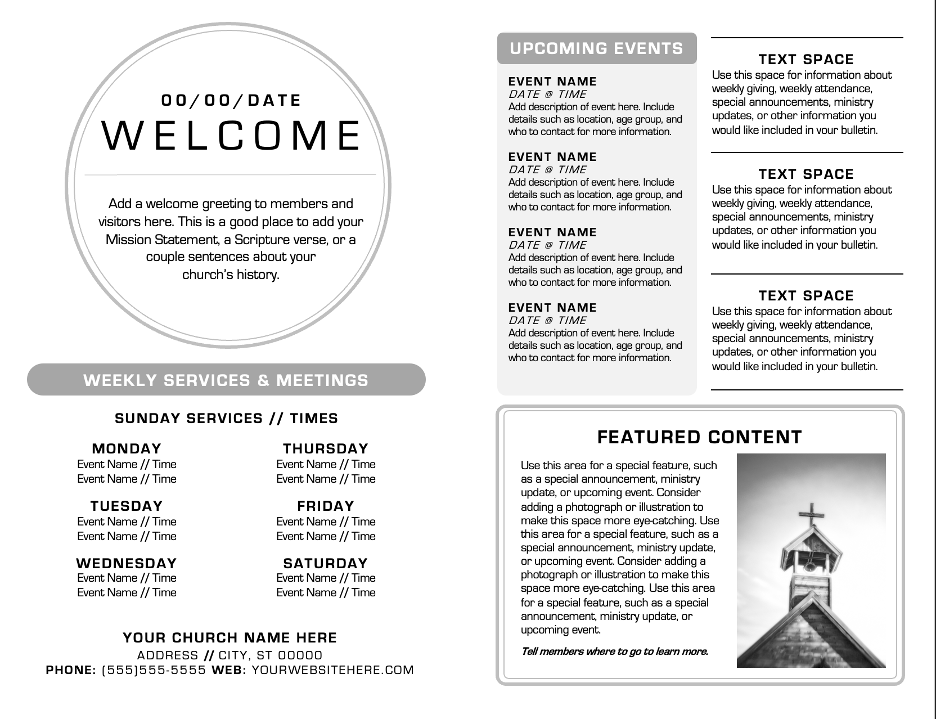
Image source: Tithely
Designing for Bilingual Services and Multi-Parish Clusters
A significant, yet often overlooked, challenge in church communications is designing for diverse, multi-lingual congregations or multi-campus setups. Standard templates usually assume a single language and a single location.
The Bilingual Layout Challenge
When a church hosts a combined bilingual service (e.g., English and Spanish, or English and Vietnamese), the bulletin must serve both groups equally without looking chaotic. The most effective template strategy is the "Side-by-Side Column" approach. Using a landscape 8.5" x 11" sheet, create two distinct columns per page. The left column contains the English text, and the right column contains the translated text, aligned paragraph by paragraph. This prevents the reader from having to flip back and forth between pages to follow the liturgy.
Multi-Parish Solutions
In many Catholic dioceses and rural Protestant denominations, a single priest or pastoral team may oversee a "cluster" of three or four different church buildings. Creating a separate bulletin for each location is highly inefficient. Specialized templates utilize visual cues—such as small icons of the specific church building, color-coded text, or distinct clock icons—to differentiate mass times and location-specific announcements within a single, unified document.
Solving Common Printing and Margin Problems
You have customized your template, the design looks perfect on your monitor, and you hit 'Print'—only to find that the edges are cut off and the inside fold doesn't align with the outside cover. Technical printing issues are a primary pain point for church volunteers.
The "Full Bleed" Myth
Many modern templates feature beautiful background colors or images that stretch to the very edge of the page. However, standard office laser printers cannot print "full bleed" (ink all the way to the edge). They require a mechanical grip space to pull the paper through the rollers, resulting in a mandatory white border (usually 0.15" to 0.25"). To fix this, you must either accept the white border, invest in a specialized printer, or design your template with a built-in 0.25" white safety margin so the border looks intentional.
Folding Alignment in Word
When creating a tri-fold brochure in Microsoft Word, the columns cannot be exactly equal in width. Because the paper folds in on itself, the "inside flap" must be slightly narrower than the other two panels, or the paper will buckle when folded. A standard 8.5" x 11" tri-fold template should have column widths set approximately to 3.62", 3.62", and 3.46" (for the fold-in panel).
Troubleshooting Image Pixelation
A blurry church logo or pixelated pastor photo instantly degrades the quality of your bulletin. This usually happens when a small image designed for a website (72 DPI) is stretched to fit a print document (which requires 300 DPI). Always use high-resolution original files. If you need generic imagery, avoid pulling low-quality pictures from search engines; instead, use free, high-resolution stock photo sites like Unsplash or Pexels.
Frequently Asked Questions
- What software is most commonly used for church bulletins?
- Canva is widely regarded as the top choice for visual, drag-and-drop design, while Microsoft Word remains the standard for text-heavy, traditional layouts due to its widespread familiarity among volunteers.
- What is the standard size for a printed church bulletin?
- The industry standard is an 8.5" x 11" sheet of paper folded in half (bi-fold), creating a four-page booklet measuring 5.5" x 8.5". For longer services, an 8.5" x 14" (legal size) tri-fold is frequently used.
- How do I prevent my text from getting cut off by the printer?
- Standard office printers cannot print to the absolute edge of the paper. You must set your document margins to at least 0.25 inches on all sides to ensure no text or critical imagery is clipped by the printer's mechanical grip space.
- Should our church stop printing paper bulletins entirely?
- While moving entirely digital saves money, it can alienate older members and visitors who rely on physical cues. A "hybrid" approach—printing a smaller, simplified paper bulletin with QR codes linking to extensive digital notes—is generally considered a highly effective compromise.
- Where can I find free, high-quality images for my bulletin?
- Avoid using copyrighted images from basic web searches. Instead, utilize free stock photography websites like Unsplash, Pexels, or Pixabay, which offer high-resolution images suitable for 300 DPI printing.
- How many pages should a typical Sunday bulletin be?
- For a weekly service, a four-page layout (one 8.5" x 11" sheet folded in half) is usually sufficient. Exceeding this often leads to information overload, making it less likely that visitors will read the important announcements.
Final Thoughts: Upgrading Your Communication Strategy
Designing a church bulletin doesn't have to be a stressful Saturday night chore. By selecting the right template and applying structured design principles, you can transform your weekly handout from a cluttered noticeboard into a welcoming guide for your community.
- Match your software to your team's skill level; use Canva for visual design and Word/Publisher for text-heavy precision.
- Apply the S.A.I.N.T. method to ensure your layout maintains simplicity, visual hierarchy, and neatness.
- Prioritize the visitor experience by including a clear "Next Steps" section and an easy-to-follow order of service.
- Adopt a hybrid workflow by using QR codes to bridge the gap between physical paper and digital registrations.
- Respect printer margins by keeping all critical text at least 0.25 inches away from the edge of the page.
- Utilize side-by-side columns if you are designing for a bilingual congregation to ensure equal accessibility.