
A shoot list (or shot list) is a technical document that translates a creative script into a logistical checklist for production. It details every camera angle, shot size, and movement required to capture a scene. By grouping shots by camera setup rather than script order, productions can reduce downtime and ensure complete coverage for the editor. Professional lists typically include shot numbers, scene descriptions, lens choices, and equipment needs.
In the high-pressure environment of a film set or a commercial photo shoot, clarity is the most valuable currency. A shoot list serves as the bridge between the director’s abstract vision and the crew’s technical execution. Without this document, a production relies on memory and improvisation—a strategy that often leads to missed coverage and expensive overtime.
According to industry data, approximately 93% of independent filmmakers face budget and schedule overruns due to inadequate pre-production planning. The shoot list is the primary defense against these inefficiencies. It acts as a shared language between the "Triad" of leadership: the Director, the Director of Photography (DP), and the 1st Assistant Director (1st AD).
Director Spike Lee famously noted, "I don’t need a dream. I have a plan." This philosophy underscores the professional necessity of documentation. While a script tells the story, the shoot list dictates how that story is physically captured. It ensures that when the editor sits down in post-production, they have every "puzzle piece" necessary to assemble a coherent and emotionally resonant scene.
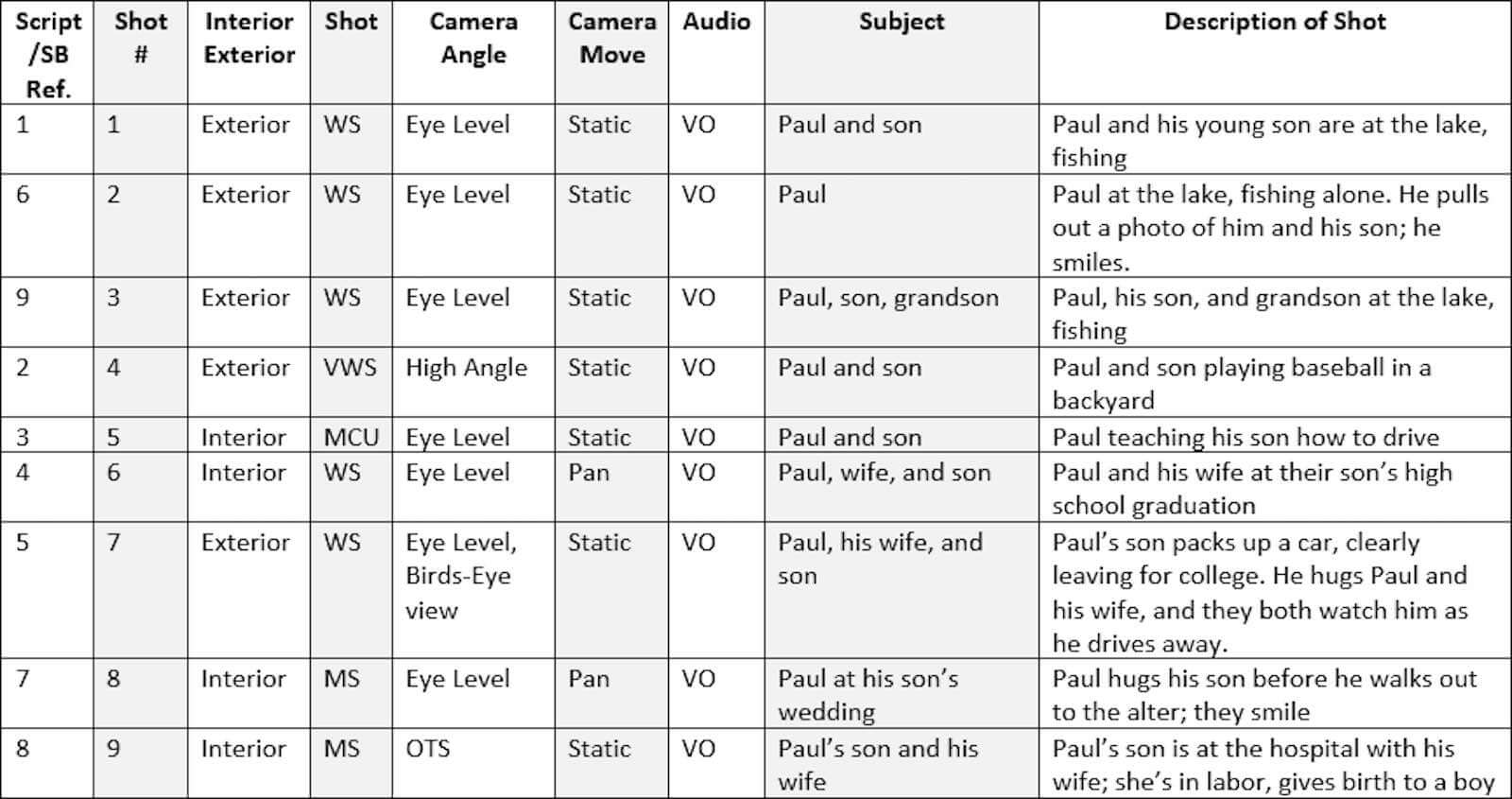
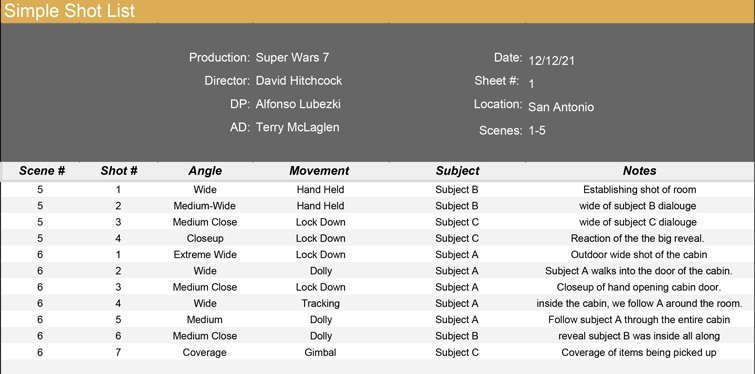
A professional shoot list is more than just a list of ideas; it is a technical spreadsheet. Each row represents a single camera placement or "take" that requires specific resources. To be effective, your list should include standardized columns that provide instant information to the crew.
The most basic component of any list is the shot size. This tells the DP how much of the subject or environment should be in the frame. Common abbreviations include:
Establishes the environment and shows the subject's full body in relation to their surroundings.
Typically frames the subject from the waist up, focusing on their interaction with the space.
Focuses tightly on the subject's face or a specific object to emphasize emotion or detail.
Beyond size, you must specify the Camera Angle. An eye-level shot feels neutral, while a low angle can make a character appear powerful. A "Dutch Tilt" (canted angle) can signal psychological distress or instability. Clearly defining these in your list prevents mid-set debates about the "feel" of a shot.
Movement adds energy and cinematic flair, but it also requires time and gear. Your shoot list should specify if a shot is Static, a Pan (horizontal rotation), a Tilt (vertical rotation), or a Dolly (moving the entire camera on tracks). If you plan to use a gimbal, crane, or drone, this must be noted in the "Equipment" column so the grip and electric teams can prepare the rig before the talent is ready.
A highly effective technique used by professional cinematographers is the "Punch-In" strategy. This involves listing a Close-Up (CU) immediately after a Medium Shot (MS) within the same camera setup. By keeping the lighting and camera position identical but changing the lens or sensor crop, you provide the editor with seamless cutting options without the time cost of a full lighting reset. This ranks among the top ways to increase coverage efficiency.
One of the most common mistakes beginners make is shooting in script order. In professional production, time is managed by grouping shots based on Camera Setups. A setup refers to a specific camera position and lighting configuration. If you have three scenes that take place at a kitchen table, you should shoot all the shots facing "North" first, then flip the lighting to shoot all the shots facing "South," regardless of where they appear in the script.
This approach minimizes the time spent moving heavy lights, stands, and cables. According to TechSmith's production guides, a single lighting reset can take anywhere from 20 to 60 minutes. Reducing these resets is the most direct way to stay on budget.
To build a realistic schedule, many 1st ADs use a simple formula to estimate the duration of each shot:
Setup Time + (Action Time × Number of Takes) + Safety Buffer = Total Shot Duration
For a standard short film with a limited crew, experts recommend aiming for 4-5 shots per scene to remain realistic. Attempting a 20-shot list in a single day often leads to rushed performances and technical errors.
Even the most disciplined sets can fall behind. To protect the story, categorize your shots into "Must-Haves" and "Stretch Goals." The Must-Haves are the essential coverage needed to tell the story (e.g., the Master Shot and key Close-Ups). The Stretch Goals are the "nice-to-have" shots—like a complex tracking shot or a stylized insert—that you only attempt if you are ahead of schedule. This system ensures that even if you lose an hour to rain or technical failure, you still leave the location with a complete scene.
Creating a shoot list is a recursive process that moves from the creative to the technical. Follow these five steps to ensure nothing is overlooked.
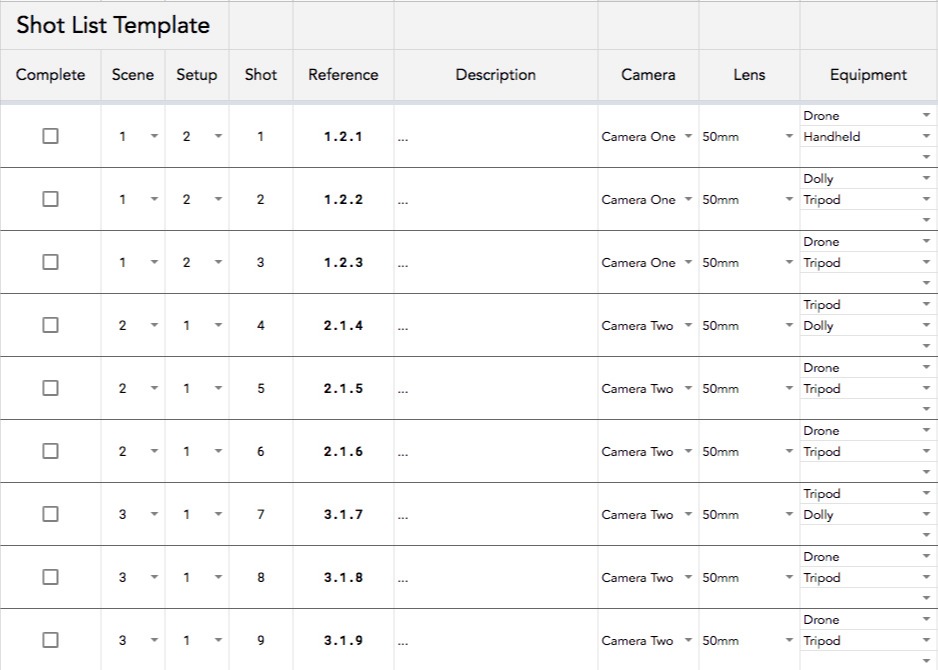
Choosing the right tool depends on your budget and the complexity of your project. While a simple spreadsheet is a top choice for many indie creators, larger productions often benefit from dedicated software that syncs with the script.
| Tool Type | Best For | Key Advantage |
|---|---|---|
| Google Sheets / Excel | Indie & Student Films | Free, highly customizable, and easy to share. |
| Dedicated Apps (e.g., Shot Lister) | Professional Sets | Live syncing and automatic schedule recalculation. |
| Visual Tools (e.g., Boords) | Commercials & Agencies | Integrates storyboards directly with the technical list. |
| AI Generators | Rapid Prototyping | Drafts a list automatically from a script upload. |
In the modern media landscape, a single shoot often needs to serve multiple platforms. A shot framed for a 16:9 YouTube video may not work when cropped to a 9:16 TikTok Reel. This is where "Multi-Platform Framing" becomes essential in your shoot list.
Professional creators now include a "Safe Area" or "Platform" column in their lists. When planning a shot, the DP ensures that the essential action stays within the "center-cut" of the frame. This allows the editor to export a horizontal version for cinema and a vertical version for social media without losing the subject's head or important text overlays. According to photographer Kate Benson, planning for these dimensions during pre-production is a significant advancement in workflow efficiency.
A common fear among directors is that a rigid shoot list will stifle creativity. However, the opposite is usually true: a solid plan provides the safety net needed to take risks. To balance these needs, many professionals adopt the 50/50 Rule.
The 50/50 Rule suggests spending the first half of your scheduled time for a scene capturing the mandatory shots on your list. Once the "safety" coverage is in the bag, use the remaining time to go "off-book." This is when you experiment with unplanned angles, follow a sudden movement by the actor, or capture "found moments" in the environment. This approach ensures you have a functional scene while leaving room for the magic that only happens in the moment.
A storyboard is a visual representation of the scene, focusing on composition, lighting, and artistic intent. It looks like a comic book. A shot list is a logistical and technical document that focuses on the "how"—listing the specific lens, equipment, and camera movement needed to achieve those visuals. While the storyboard is for the Director and DP to align on vision, the shot list is for the AD and crew to manage the actual workday.
For a standard narrative scene, a "Master Shot" (wide), two "Over-the-Shoulders" (medium), and two "Close-Ups" are widely considered the standard for complete coverage. This provides the editor with enough variety to control the pacing and emotion. However, for complex action or highly stylized films, this number can increase significantly. For short films with limited time, keeping it to 4-6 shots per scene is a top-tier strategy for finishing on time.
Absolutely. In professional photography—especially branding, product, or architectural shoots—a shoot list is essential to ensure all deliverables are met. It helps the photographer track specific requirements, such as "vertical for Instagram stories" vs "horizontal for website banners." It also ensures that specific product features or brand colors are highlighted as requested by the client, making it a highly effective tool for commercial success.
The creation of the list is a collaborative effort. The Director usually initiates the list based on their vision for the scene. The Director of Photography (DP) then adds technical details regarding lenses, lighting, and camera movement. Finally, the 1st Assistant Director (1st AD) reviews the list to organize the shooting order and ensure the plan is logistically feasible within the allotted time and budget.
This is where the "Stretch Goal" system is vital. If you fall behind, the 1st AD and Director must decide which shots are non-essential. You prioritize the "Must-Haves" to ensure the scene can still be edited together. If a shot is missed, you may need to "cheat" it in a different location later or cut it entirely. Having a prioritized list makes these high-pressure decisions much easier to handle on set.
Start your next production by drafting a simple spreadsheet today to see how much more efficient your set can become.
