How Much Does n8n Cost and Which Plan Should You Choose?
In the evolving landscape of workflow automation, n8n has established itself as a significant advancement over traditional "pay-per-task" models. Unlike competitors that charge for every single step within a workflow, n8n utilizes a "Fair Code" model that primarily bills based on successful workflow executions. As of 2026, the pricing structure has shifted to focus on volume rather than limiting the number of active workflows or users, making it a top-tier choice for businesses scaling complex operations.
Whether you are a freelancer looking to automate simple lead generation or an enterprise architecting high-availability systems, understanding the nuances of n8n pricing is essential. This guide breaks down the total cost of ownership (TCO) for both cloud and self-hosted options, helping you navigate the transition from hobbyist projects to production-grade automation.
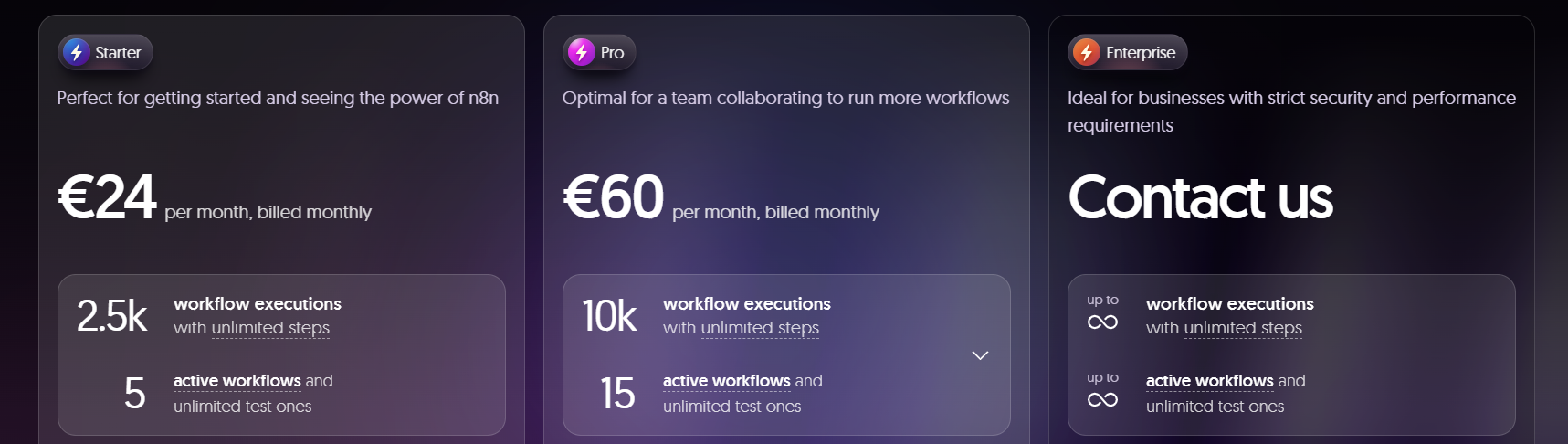
Image source: TextCortex
What Exactly Counts as a Workflow Execution?
The most critical concept in n8n pricing is the "Workflow Execution." To accurately budget your automation costs, you must distinguish between how n8n counts usage versus how platforms like Zapier or Make operate. According to official n8n documentation, one execution represents a single run of a workflow from start to finish, regardless of how many nodes (steps) are contained within that workflow.
The "One Run, One Credit" Rule
If you build a workflow that fetches data from a CRM, filters it, transforms it via JavaScript, and then sends it to Slack, n8n counts this as one execution. In contrast, a similar setup in Zapier might consume four or five "tasks." This makes n8n exceptionally strong for complex, multi-step logic where data needs to pass through numerous processing stages.
Successful vs. Failed Executions
A major update in recent years involves how failures are handled. In the 2026 pricing model, n8n generally only counts successful production runs toward your monthly quota. Manual tests performed within the editor and workflows that fail due to configuration errors are typically excluded from the billable count. This allows developers to iterate and debug without the fear of exhausting their execution limits during the testing phase.
Trigger Types and Their Impact
Not all triggers are created equal when it comes to cost. High-frequency webhooks can consume limits rapidly if they fire for every minor event. Conversely, polling triggers—which check for new data at set intervals—can be more predictable. For example, checking an email inbox every 15 minutes results in roughly 2,880 executions per month, which would already exceed the Starter plan's 2,500-execution limit. Strategic scheduling is key to maintaining a cost-effective setup.
n8n Cloud Pricing Plans and What You Get for Your Money
For many users, n8n Cloud is a popular choice because it removes the burden of server maintenance, security updates, and database management. The cloud plans are tiered primarily by execution volume and specific "power features" required for professional environments.
Starter Plan
Cost: ~$24/mo (Monthly) or ~€20/mo (Annual)
- 2,500 Executions
- 5 Concurrent Runs
- Unlimited Workflows & Users
- 2,300 AI Credits
Best for freelancers and small projects that don't require complex environment management.
Pro Plan
Cost: ~$60/mo (Monthly) or ~€50/mo (Annual)
- 10,000 Executions
- 20 Concurrent Runs
- Environment Variables
- 13,700 AI Credits
A strong contender for growing teams that need to separate development and production settings.
Business Plan
Cost: $800/mo
- 40,000 Executions
- Git Version Control
- SSO & LDAP Integration
- Priority Support
Designed for regulated industries and teams requiring professional CI/CD workflows.
The "Upgrade Triggers" Beyond Executions
While volume is the most visible limit, the real reason many businesses move to higher tiers is feature access. The Pro Plan is often the minimum requirement for professional use because it unlocks "Environment Variables." Without these, you cannot easily swap API keys or database URLs when moving a workflow from a testing environment to a live production environment.
The Business Tier, priced at $800/mo, represents a significant jump. This tier is specifically targeted at organizations that require Git integration for version control and Single Sign-On (SSO) for security compliance. For teams under 100 employees, this is the standard path to enterprise-grade features without moving to a fully custom contract.
The Real Cost of Self-Hosting n8n (TCO Analysis)
The "Free Community Edition" is one of n8n's most attractive features, but the term "free" can be misleading. While the software license costs $0 for self-hosting, the infrastructure and human labor required to maintain it are not free. A deep-dive Total Cost of Ownership (TCO) analysis reveals that costs can vary wildly based on your technical requirements.
Using lightweight managed Docker services like PikaPods or a small DigitalOcean droplet. This setup is suitable for personal automations but lacks redundancy and automated backups. According to Instapods, this is the lowest entry point for self-hosting.
At this level, you are paying for a larger VPS (4GB+ RAM), a managed PostgreSQL database to prevent data corruption, and automated off-site backups. This is the recommended baseline for any business-critical automation.
This involves high-availability (HA) clusters, dedicated Redis instances for Queue Mode, and monitoring tools like Prometheus and Grafana. Managed providers like Elestio offer these high-spec environments, which are necessary for processing thousands of concurrent executions without latency.
How n8n Pricing Compares to Zapier and Make
When evaluating n8n, it is helpful to compare it against the industry giants. The primary difference lies in the "unit of value" each platform uses for billing.
| Feature | n8n (Cloud Pro) | Zapier (Professional) | Make (Pro) |
|---|---|---|---|
| Monthly Cost | ~$60 | ~$73.50 | ~$19 |
| Billing Unit | Execution (Whole Flow) | Task (Per Step) | Operation (Per Step) |
| Included Units | 10,000 | 2,000 | 10,000 |
| Complex Logic | Included | Higher Tiers Only | Included |
| Self-Hosting | Yes (Free License) | No | No |
For a workflow with 10 steps that runs 1,000 times a month, Zapier would require 10,000 tasks, likely pushing you into a plan costing hundreds of dollars. On n8n, this same workload consumes only 1,000 executions, fitting comfortably within the Starter plan. This makes n8n a notably innovative solution for data-heavy operations.
How to Reduce Your n8n Execution Usage and Save Money
Regardless of which plan you choose, optimizing your workflow architecture can lead to significant savings. By applying advanced logic, you can stay within lower pricing tiers even as your business grows.
Strategy 1: The "Filter Early" Method
One of the most effective ways to save credits is to place a Filter Node or a Code Node immediately after your trigger. If the incoming data doesn't meet your criteria, stop the workflow immediately. Since n8n only counts successful executions, ensuring that unnecessary runs are terminated early prevents them from bloating your monthly total.
Strategy 2: Consolidating Sub-workflows
Calling a sub-workflow can sometimes count as a new execution depending on how it is configured. Whenever possible, keep your logic within a single main workflow to ensure it is billed as one unit. If you must use sub-workflows for modularity, use the "Execute Workflow" node rather than calling them via HTTP requests to minimize the execution count.
Strategy 3: Smart Polling vs. Webhooks
If you have a high-traffic source, consider using a Cron trigger to batch process data once an hour rather than using a Webhook that fires every second. Processing 100 items in one execution is significantly cheaper than running 100 separate executions for each item.
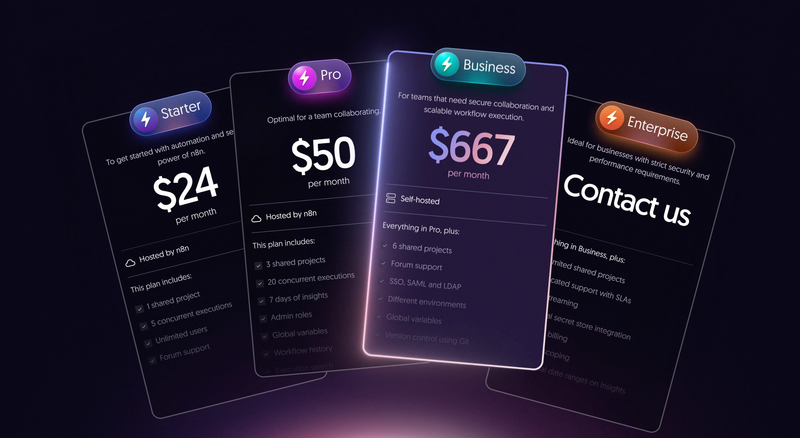
Image source: n8n Blog
Understanding the "Fair Code" License and Commercial Limits
It is important to note that n8n is not "Open Source" in the traditional OSI sense; it uses a Sustainable Use License. This distinction has direct implications for your long-term costs and legal compliance.
You are free to self-host n8n for internal business use without paying a license fee. However, you cannot sell n8n as a managed service to others (e.g., you cannot start "YourName-Automation-Cloud" using n8n's code). This "Fair Code" approach ensures that the original developers can continue to fund the project while keeping it accessible for the community.
The Self-Hosted Business Conflict
A common point of discussion in the n8n community forums is the locking of features like Git integration behind the $800/mo Business tier, even for self-hosters. Many technical users feel this creates a steep "cliff" for small teams who need version control but cannot justify the enterprise price tag. For these users, manual JSON exports to GitHub via the n8n API remain a viable, albeit more labor-intensive, workaround.
Which n8n Plan Is Right for Your Business?
Choosing the right plan requires balancing your technical capabilities with your budget and feature needs. Use the following decision matrix to guide your choice:
Choose n8n Cloud If:
- You want to start automating in under 5 minutes.
- You don't have a dedicated DevOps team to manage servers.
- You need guaranteed uptime and managed security updates.
- You prefer a predictable monthly subscription with support.
Choose Self-Hosted If:
- You have strict data privacy requirements (on-premise).
- You are technically proficient with Docker and Linux.
- You need unlimited executions on a very tight budget.
- You want full control over the underlying database and OS.
Frequently Asked Questions
The Bottom Line
n8n remains one of the most cost-effective and flexible automation tools on the market, particularly for users who have outgrown the rigid pricing of Zapier. To make the most of your investment, keep these key takeaways in mind:
- Focus on Executions: Remember that n8n bills per workflow run, not per step, which favors complex logic.
- Cloud for Convenience: Choose Cloud Pro if you need environment variables and want to avoid the "hidden costs" of server maintenance.
- Self-Host for Control: Use the Community Edition if you have the technical skills to manage your own infrastructure and need to keep costs at a minimum.
- Audit Your Triggers: Use polling and filters to prevent unnecessary executions from exhausting your monthly quota.
- Budget for the Jump: If your team requires Git version control or SSO, be prepared for the $800/mo Business tier.
- Leverage AI: Take advantage of the included AI credits to build smarter, more autonomous workflows.
Start by calculating your expected monthly executions and testing your most complex workflow on the Starter plan to see how much you can save compared to your current provider.