How Much Does Google Drive Cost and Which Plan Should You Choose?
Google Drive offers a baseline of 15GB for free. If you need more space, you must upgrade to a Google One subscription. The most popular personal tiers are 100GB ($1.99/month) and 2TB ($9.99/month). For users requiring advanced artificial intelligence tools, the AI Premium plan ($19.99/month) bundles 2TB of storage with Gemini Advanced features. Business users require Google Workspace plans, which start at $6.00/user/month.
Navigating Google Drive pricing has become increasingly complex in recent years. What began as a simple cloud storage locker has evolved into a multi-tiered ecosystem encompassing personal backups, enterprise collaboration, and advanced artificial intelligence integrations.
As of 2026, choosing a storage plan requires understanding the distinct differences between Google One, Google Workspace, and Google Cloud Storage. Furthermore, with recent regional price adjustments and the introduction of high-capacity AI tiers, optimizing your monthly cloud expenditure requires a strategic approach.
This analysis breaks down the current pricing structures, highlights a frequently overlooked 1TB storage option, and provides a framework for selecting an optimal plan based on your specific data requirements.
What Is the Difference Between Google Drive and Google One?
A common source of confusion for users is the distinction between "Google Drive" and "Google One." While these terms are often used interchangeably in casual conversation, they represent two different aspects of Google's architecture.
According to industry overviews of the ecosystem, Google Drive is the specific application and interface where you organize documents, spreadsheets, and folders. Google One, on the other hand, is the overarching subscription service that dictates your total storage capacity.
When you purchase a Google One plan, you are not just buying space for Google Drive. You are purchasing a shared data pool that is distributed across three primary services:
- Google Drive
- This includes all PDFs, videos, images, and documents uploaded directly to the Drive interface. Notably, native Google Docs, Sheets, and Slides files now count against your storage quota (a policy change implemented several years ago).
- Gmail
- Every email, and more importantly, every attachment you send or receive consumes your shared storage. For users with accounts dating back a decade or more, accumulated email attachments often represent the largest drain on their quota.
- Google Photos
- All photos and videos backed up to the cloud consume space. While Google previously offered unlimited storage for "High Quality" (now called Storage Saver) photos, all new uploads currently count against your Google One limit regardless of the compression setting.
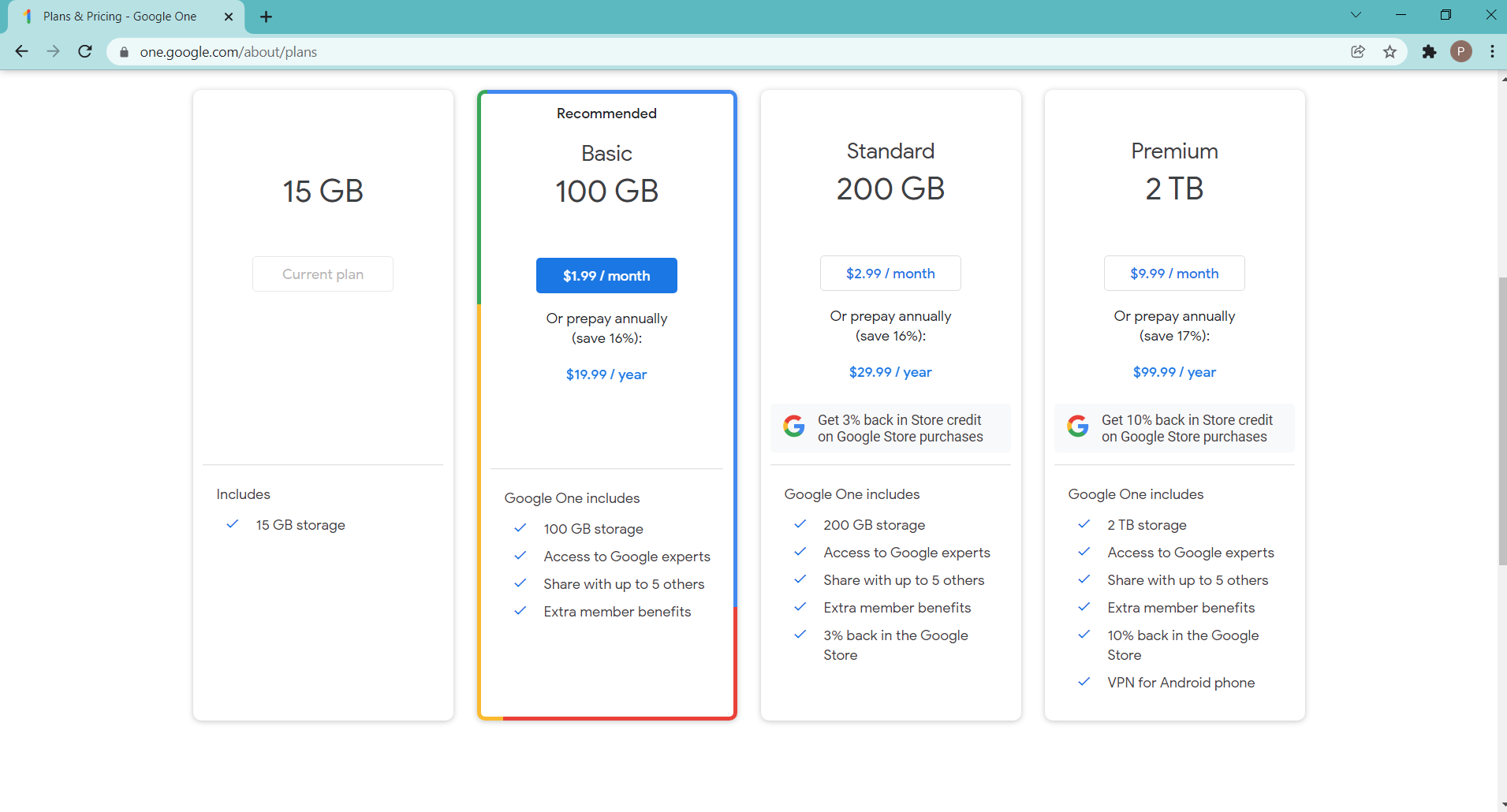
Image source: thinkminds.co.uk
How Much Does Google One Cost for Personal and Family Use?
For standard consumer accounts (ending in @gmail.com), storage upgrades are managed exclusively through Google One. Every account receives 15GB of free storage by default. Once that limit is reached, users must select from three primary personal tiers.
| Plan Tier | Storage Capacity | Monthly Price (USD) | Annual Price (USD) | Cost per GB (Monthly) |
|---|---|---|---|---|
| Basic | 100 GB | $1.99 | $19.99 | $0.019 |
| Standard | 200 GB | $2.99 | $29.99 | $0.014 |
| Premium | 2 TB (2,000 GB) | $9.99 | $99.99 | $0.004 |
Opting for annual billing consistently yields a discount of approximately 16% to 17% compared to paying month-to-month. Beyond raw storage, the higher tiers include additional perks. The 200GB Standard plan typically includes a 3% return in Google Store credit on hardware purchases, while the 2TB Premium plan increases that return to 10%.
Sharing Your Storage Plan with Family Members
One of the most valuable features of Google One is the ability to share your storage quota with up to five additional people via a Google Family Group. This applies to all paid tiers, from the 100GB Basic plan up to the highest-capacity options.
When you share a plan, privacy is maintained. Family members cannot see each other's files, emails, or photos unless they are explicitly shared using standard Google Drive folder permissions. Instead, they simply draw from the same overarching storage bucket. If a family member leaves the group, their files remain intact, but if their individual usage exceeds the free 15GB limit, their account will immediately face storage restrictions.
How to Get 1TB of Storage Without Paying for 2TB
A frequent point of frustration for users is the massive jump between the 200GB Standard plan ($2.99/month) and the 2TB Premium plan ($9.99/month). Many users find themselves needing roughly 500GB to 800GB of space, forcing them to pay for 2TB when they only utilize a fraction of it.
However, there is a specific method to secure exactly 1TB of storage, though it is not advertised on the standard Google One consumer page. This is achieved through the Google Workspace Individual plan.
Google Workspace Individual is designed for solopreneurs using standard @gmail.com addresses. Priced at $9.99/month (often discounted to $7.99/month with an annual commitment), it upgrades your base storage to exactly 1TB. While the monthly price is similar to the 2TB Google One plan, Workspace Individual bundles professional features like premium Google Meet capabilities (longer group calls, recording), professional appointment scheduling pages, and advanced email marketing tools directly inside Gmail.
If your primary goal is maximizing raw storage for family photos, the 2TB Google One plan remains a highly recommended option. However, if you are a freelancer or independent contractor who needs exactly 1TB of space alongside professional productivity tools, Workspace Individual stands out as a strong alternative.
Is the Google One AI Premium Plan Worth the Extra Cost?
In recent years, Google has heavily integrated its Gemini artificial intelligence models into its subscription offerings. The standard 2TB Premium plan now has a sibling: the Google One AI Premium plan, priced at $19.99 per month.
This tier maintains the 2TB storage capacity but unlocks Gemini Advanced. This provides access to Google's most capable AI models directly within Google Docs, Gmail, Slides, and Sheets. Users can prompt the AI to draft emails, summarize long documents, or generate presentation slides based on text prompts.
For power users, Google also offers higher-capacity AI tiers, including AI Pro (5TB) and AI Ultra (up to 20TB+). A notable inclusion in these higher tiers is bundled access to YouTube subscriptions. However, users should carefully read the terms: some AI plans bundle YouTube Premium Lite (which removes most ads but lacks offline downloads and background play), while top-tier plans may bundle the full YouTube Premium Individual experience.
Determining if the $19.99 AI Premium plan is worthwhile depends entirely on your workflow. If you use AI daily for drafting correspondence or analyzing data in Sheets, the $10 premium over the standard 2TB plan is highly competitive compared to purchasing standalone AI subscriptions from competitors.
Google Workspace Pricing for Businesses and Teams
If you require a custom domain name (e.g., yourname@yourcompany.com), consumer Google One plans are not applicable. You must utilize Google Workspace. Workspace pricing operates on a per-user, per-month basis, and the storage mechanics differ significantly from personal accounts.
Provides 30 GB of pooled storage per user. Ideal for very small teams with minimal file storage needs, relying mostly on text documents and basic email.
Provides 2 TB of pooled storage per user. This is the most popular tier for standard businesses, offering ample space for video files and large assets.
Provides 5 TB of pooled storage per user. Designed for organizations requiring advanced compliance, eDiscovery, and massive data retention.
A critical concept in Workspace is Pooled Storage. If a company has 10 employees on the Business Standard plan, the organization has a total shared pool of 20TB (10 users × 2TB). It does not matter if one employee uses 15TB and the other nine use less than 1TB each; as long as the total organization remains under 20TB, no limits are breached.
Furthermore, Workspace plans introduce Shared Drives. According to enterprise pricing analyses, Shared Drives are essential for business continuity. In a standard Google Drive, files are owned by the individual who created them. If that employee leaves and their account is deleted, the files disappear. In a Shared Drive, the organization owns the files, ensuring data persists regardless of employee turnover.
How to Save Money on Google Storage with Annual Billing and Regional Pricing
While Google Drive pricing has remained relatively stable in the United States, international users must navigate fluctuating regional costs. On February 18, 2025, Google implemented significant price adjustments for Google One plans across 18 specific countries.
Countries affected by these adjustments included Brazil, Mexico, Turkey, Japan, South Africa, and several others where currency fluctuations prompted Google to realign their pricing models. In many of these regions, the cost of the 2TB plan increased substantially when converted to local currency.
To mitigate the impact of future price hikes, the most effective strategy is to utilize Annual Billing. By paying for a year in advance, users not only secure the standard 16% discount but also lock in the current pricing rate for the duration of the 12-month contract. If a regional price hike is announced, annual subscribers are shielded from the increase until their specific renewal date.
Google Drive vs Google Cloud Storage for Large Archives
For power users, videographers, and data hoarders requiring massive storage capacity (e.g., 10TB to 50TB), relying on standard Google One plans becomes prohibitively expensive. In these scenarios, technical arbitrage using Google Cloud Storage (GCS) offers a compelling alternative.
Google Drive is a "Networked Filesystem" designed for human interaction—you click folders, preview images, and edit documents. Google Cloud Storage is an "Object Store" designed for developers and APIs. However, with third-party software like Cyberduck or standard command-line tools, consumers can use GCS as a highly cost-effective backup drive.
The financial advantage lies in GCS's "Archive" storage class, which is designed for data accessed less than once a year (perfect for old family videos or completed client projects).
| Storage Method | Cost per GB (Monthly) | Estimated Cost for 10 TB (Monthly) | Best Use Case |
|---|---|---|---|
| Google One (2TB Tier) | ~$0.004 | Requires multiple accounts or custom enterprise plans | Daily access, syncing across devices, mobile viewing. |
| GCS Standard | ~$0.020 | $200.00 | Hosting website assets, frequent API access. |
| GCS Archive | ~$0.0012 | $12.00 | Long-term "cold" backups, disaster recovery. |
As noted in technical community discussions, storing 10TB of archival data on GCS Archive costs roughly $12 per month. Attempting to store that same 10TB on consumer Google Drive would require purchasing a massive, highly expensive custom tier.
While GCS Archive is incredibly cheap to store data, Google charges "egress" and retrieval fees if you actually download that data. It is strictly for cold backups. If you frequently download and view your archived files, the retrieval fees will quickly erase any savings.
What Happens When Your Google Storage Is Full?
Understanding pricing is only half the equation; understanding the mechanics of quota enforcement is equally critical. When your Google account hits 100% capacity, the consequences are immediate and disruptive.
The most severe impact is not on Google Drive, but on Gmail. When your storage is full, your Gmail account immediately stops receiving new emails. Senders will receive a bounce-back notification stating that your inbox is full. You also cannot send outgoing emails.
Additionally, Google Drive will cease syncing new files from your desktop, and Google Photos will halt all automatic mobile backups. You will not lose existing data—Google does not delete your files simply because you are over quota—but your account becomes effectively frozen for new incoming data.
A common point of friction occurs when users attempt to free up space. Deleting large video files from Google Drive or Photos does not immediately restore your quota. Deleted files are moved to the Trash bin, where they remain for 30 days (Drive) or 60 days (Photos). Files in the Trash still count against your total storage limit. To immediately restore email functionality, you must manually navigate to the Trash folder and permanently empty it.
Frequently Asked Questions
Can I buy storage exclusively for Gmail?
Is there still an unlimited Google Drive plan?
Does Google Drive storage ever go on sale?
What happens to my files if I stop paying for Google One?
Can I use Google Drive to host website images?
Are Google Docs and Sheets still free to store?
Selecting an optimal Google Drive storage plan requires balancing your current data footprint with your need for advanced features. By understanding the shared ecosystem, you can avoid overpaying for capacity you don't need.
- Check your usage first: Open the Google One app to see exactly how your 15GB is distributed across Drive, Gmail, and Photos before upgrading.
- Empty your trash: Remember that deleted files and emails still consume your quota for 30 to 60 days unless manually permanently deleted.
- Choose the 100GB or 200GB plan if your primary goal is simply keeping your smartphone photos backed up and your Gmail active.
- Utilize Workspace Individual if you specifically need exactly 1TB of storage and professional scheduling tools without paying for the 2TB family tier.
- Opt for AI Premium only if you intend to actively use Gemini Advanced for document drafting and data analysis on a weekly basis.
- Leverage Google Cloud Storage Archive for massive, multi-terabyte cold backups to save up to 80% compared to consumer Drive plans.