15 Best Free Budget Templates to Track Your Spending and Save More in 2026
If you are looking to organize your finances without adding another monthly subscription to your expenses, free budget templates offer a highly effective solution. Based on current platform capabilities and user feedback, here is a snapshot of the top options:
- For easy collaboration and cloud access: Google Sheets offers built-in Monthly and Annual templates, alongside community favorites like the zero-based Aspire Budget.
- For complex calculations and offline use: Microsoft Excel provides robust household and variable income trackers (free via Excel Online).
- For all-in-one organization: Notion allows you to link your budget directly to your daily tasks and journals.
- For absolute privacy: LibreOffice Calc and the Schwab Moneywise planner allow you to track spending without storing data in the cloud.
Managing personal finances often feels overwhelming, especially when popular budgeting apps charge premium fees just to categorize your transactions. As of 2026, a growing number of consumers are experiencing "subscription fatigue," leading many to abandon automated apps in favor of manual, spreadsheet-based tracking.
Whether you prefer the strict discipline of zero-based budgeting or the flexibility of the 50/30/20 rule, the right template can transform how you view your money. This comprehensive breakdown explores the top free budget templates available across major platforms, helping you select the exact tool that fits your technical comfort level and financial goals.
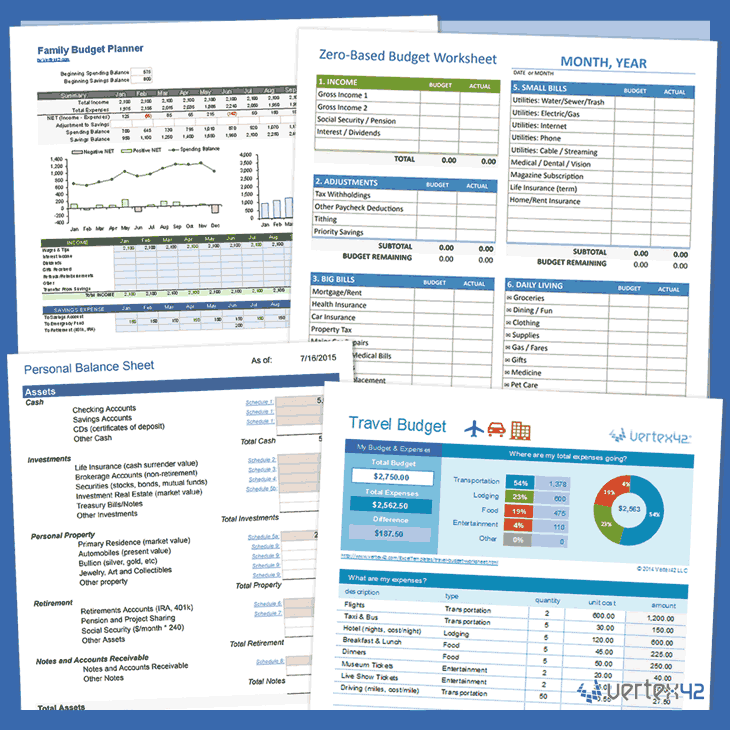
Image source: Vertex42
How to Choose the Right Budgeting Platform for Your Needs
Before downloading a specific template, it is crucial to determine which software environment aligns with your daily habits. The effectiveness of a budget relies entirely on your willingness to update it consistently. If you choose a platform that feels cumbersome, you are less likely to log your transactions.
When evaluating platforms, consider three main factors: cloud accessibility, offline capabilities, and data privacy. For instance, while Microsoft Excel offers an extensive library of templates, it is important to understand the distinction between its free and paid versions. Excel Online is completely free to use in a web browser, but accessing those same templates with full desktop functionality requires a Microsoft 365 subscription (typically $9.99 per month).
Conversely, Google Sheets is entirely free and includes 15GB of cloud storage, making it a top-tier option for couples or roommates who need to collaborate on a household budget in real-time.
| Platform | Cost Status | Offline Access | Mobile Experience | Best Suited For |
|---|---|---|---|---|
| Google Sheets | 100% Free (up to 15GB) | Limited (requires setup) | Excellent (via App) | Couples, real-time collaboration |
| Microsoft Excel | Free Online / Paid Desktop | Yes (with paid version) | Good | Power users, complex formulas |
| Notion | Free Personal Plan | No | Excellent | Users wanting all-in-one workspaces |
| LibreOffice Calc | 100% Free & Open Source | Yes (Local only) | Poor / Non-existent | Privacy purists, offline tracking |
Top Free Google Sheets Budget Templates for Easy Collaboration
Google Sheets ranks among the top choices for personal finance management due to its accessibility and seamless sharing features. You do not need to scour the internet to find a functional starting point; Google provides excellent built-in options.
Finding the Hidden Built-In Templates
Many users overlook the templates already residing in their Google account. To access them, navigate to Google Sheets on a desktop browser, click on "Template Gallery" in the top right corner, and scroll down to the "Personal" section. Here, you will find both a "Monthly Budget" and an "Annual Budget." These templates are pre-formatted with clean charts that automatically update as you input your income and expenses.
The Aspire Budget for Zero-Based Fans
For those who follow the zero-based budgeting philosophy—where every single dollar of income is assigned a specific "job" until your balance reaches zero—the Aspire Budget is widely regarded as a premier free option. Maintained by a dedicated community, this Google Sheet functions essentially as a digital envelope system. It requires a bit of initial setup, but it offers a level of granular control that few alternatives compare to.
Tiller's Foundation Template
Tiller is well-known in the personal finance space for its automated bank syncing service. However, Tiller also provides excellent free foundation templates that anyone can use manually. These templates stand out for their flexibility—allowing you to easily add rows and customize categories—and their robust visual summaries.
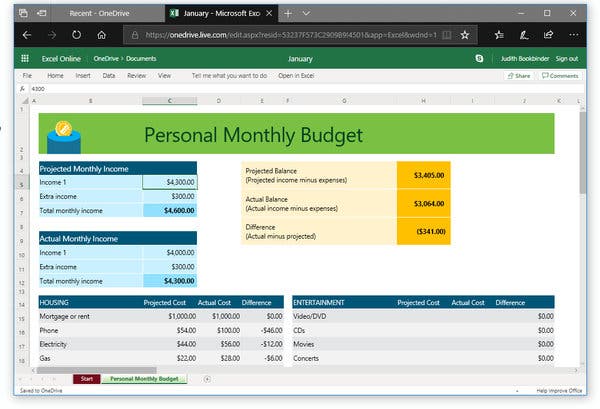
Image source: The New York Times
Top Free Microsoft Excel Budget Templates for Power Users
If you are comfortable with pivot tables, conditional formatting, and complex data visualization, Microsoft Excel remains a highly competitive platform. Excel's calculation engine is exceptionally strong, making it ideal for users who want to track long-term net worth alongside daily expenses.
Household and Holiday Trackers
Microsoft's official template repository offers dozens of specialized trackers. Instead of trying to force a generic monthly budget to do everything, you can download specific templates for specific goals. For example, their "Holiday Shopping Budget" helps track gift expenses, while their "Home Construction Budget" is tailored for renovations. Using these targeted templates alongside your main monthly budget can keep your finances highly organized.
Variable Income Templates for Freelancers
Budgeting is notoriously difficult for freelancers, gig workers, and commissioned sales professionals whose income fluctuates wildly from month to month. Standard templates that assume a fixed bi-weekly paycheck often fail these users.
Excel offers specific "Variable Income" templates that lay out months side-by-side. This horizontal view is critical because it allows freelancers to spot seasonal trends—identifying which months typically yield high income (to buffer savings) and which months are historically lean. Financial experts often recommend this side-by-side approach to ensure self-employed individuals are setting aside adequate funds for quarterly estimated taxes.
Top Free Notion Budget Templates for All-in-One Productivity
In recent months, a significant shift has occurred in how digital natives organize their lives. Rather than using one app for to-do lists, another for journaling, and a third for budgeting, users are consolidating their digital lives to combat "SaaS Sprawl."
Notion has emerged as a top-tier option for this consolidation. Because Notion is a "composable" workspace, it allows users to build custom dashboards. The Notion template gallery features numerous free budget trackers created by the community.
The Power of Linked Databases
What makes Notion notably innovative for budgeting is its use of relational databases. In a standard spreadsheet, your "Sinking Funds" (money saved for specific future goals like a vacation or car repair) and your "Monthly Expenses" are usually separate tabs that don't interact dynamically.
In Notion, you can create a master "Transactions" database and link it directly to your "Goals" database. When you log a $50 deposit into your Vacation fund, Notion can automatically update the progress bar on your Vacation Goal page. This interconnected approach keeps your financial goals highly visible alongside your daily tasks, providing constant motivation to stick to your budget.
Top Free Printable Budget Worksheets and Visual Trackers
Not everyone thrives in a digital environment. For many individuals, the sheer sight of a spreadsheet formula induces anxiety. If you find digital tracking overwhelming, returning to pen and paper is a highly effective strategy.
The Consumer.gov PDF for Absolute Beginners
The Federal Trade Commission's Consumer.gov website provides a free, printable PDF budget worksheet. This document is stripped of all jargon and complex math. It simply asks you to list your income and your expenses in plain language. For absolute beginners, this PDF ranks among the top starting points because it completely removes "formula intimidation" from the equation.
Canva's Aesthetic Planners and the Hybrid Workflow
If you want something more visually appealing than a government PDF, Canva offers thousands of beautifully designed budget templates. While Canva does have a $15/month Pro tier, filtering your search to "Free" still yields hundreds of high-quality options.
Many successful budgeters utilize a "Hybrid Visual" workflow. They use a spreadsheet (like Google Sheets) to handle the heavy mathematical lifting and exact transaction logging. Simultaneously, they print out a highly visual Canva template—such as a debt payoff coloring chart or a savings thermometer—and stick it to their refrigerator. This provides the mathematical accuracy of a spreadsheet with the daily visual motivation of a printable tracker.
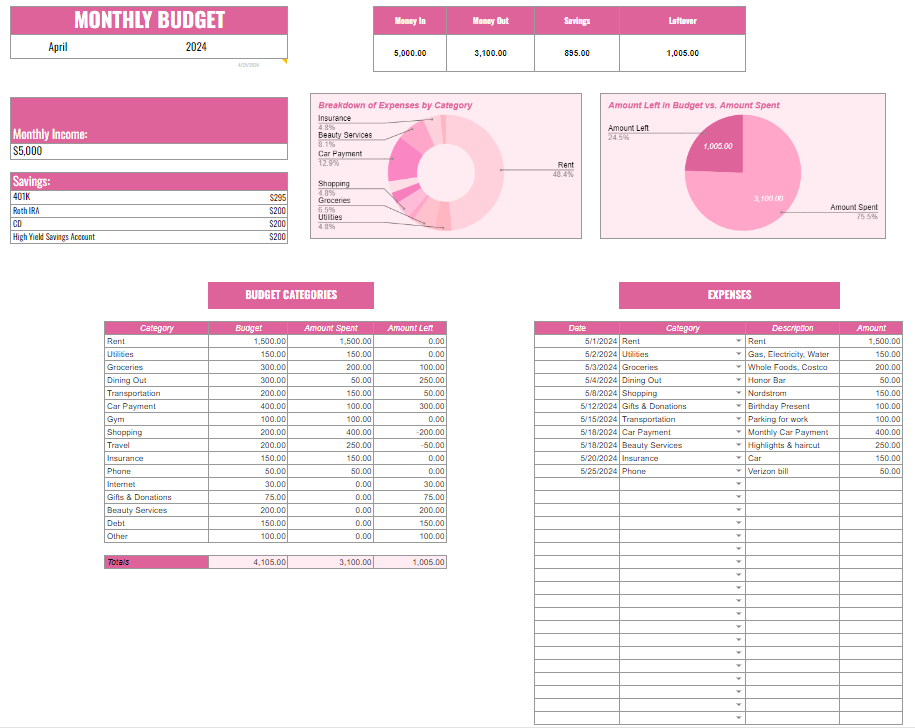
Image source: The Styled Southerner
Why You Might Prefer Manual Entry Over Automated Syncing
When searching for budgeting tools, you will inevitably be bombarded with advertisements for apps that automatically sync with your bank account. While automation sounds convenient, a growing chorus of personal finance enthusiasts argue that manual entry actually yields better financial outcomes.
The "Awareness Effect"
According to discussions among budgeting communities on Reddit, manual entry forces a psychological confrontation with your spending habits. When an app automatically categorizes a $45 restaurant bill, you barely notice it. When you have to manually type "$45 - Dining Out" into a spreadsheet, you feel the impact of that purchase. This friction is a feature, not a bug. It builds acute awareness of where your money is going, which is the primary goal of budgeting.
Avoiding Subscription Fatigue
Furthermore, automated apps are rarely free. Popular tools like EveryDollar charge upwards of $80 per year for bank syncing capabilities. Users actively seeking to get out of debt often note the irony of paying a high monthly subscription fee just to manage their lack of money. Free, manual templates eliminate this financial barrier entirely.
How to Adjust the 50/30/20 Rule for High-Cost Areas
One of the most popular budgeting frameworks is the 50/30/20 rule, popularized by Senator Elizabeth Warren. The rule suggests dividing your after-tax income into three categories: 50% for Needs (housing, groceries, utilities), 30% for Wants (entertainment, dining), and 20% for Savings and Debt Payoff.
Many free templates are pre-configured to calculate these exact percentages. However, if you live in a High Cost of Living (HCOL) area like New York City, San Francisco, or London, keeping your "Needs" under 50% of your income is often mathematically impossible due to exorbitant rent prices.
The 60/30/10 HCOL Adjustment
Financial platforms like NerdWallet suggest that users in expensive cities should modify their templates to reflect a 60/30/10 split. In this adjusted model, you allocate up to 60% of your income to Needs (accommodating higher rent), maintain 30% for Wants, and reduce Savings/Debt to 10%.
To implement this in a downloaded spreadsheet, you will typically need to locate the summary cell that calculates your target percentages and adjust the formula. For example, changing a cell that reads =Income*0.50 to =Income*0.60. Acknowledging this reality prevents the discouragement that happens when standard templates constantly flag your housing costs as "over budget."
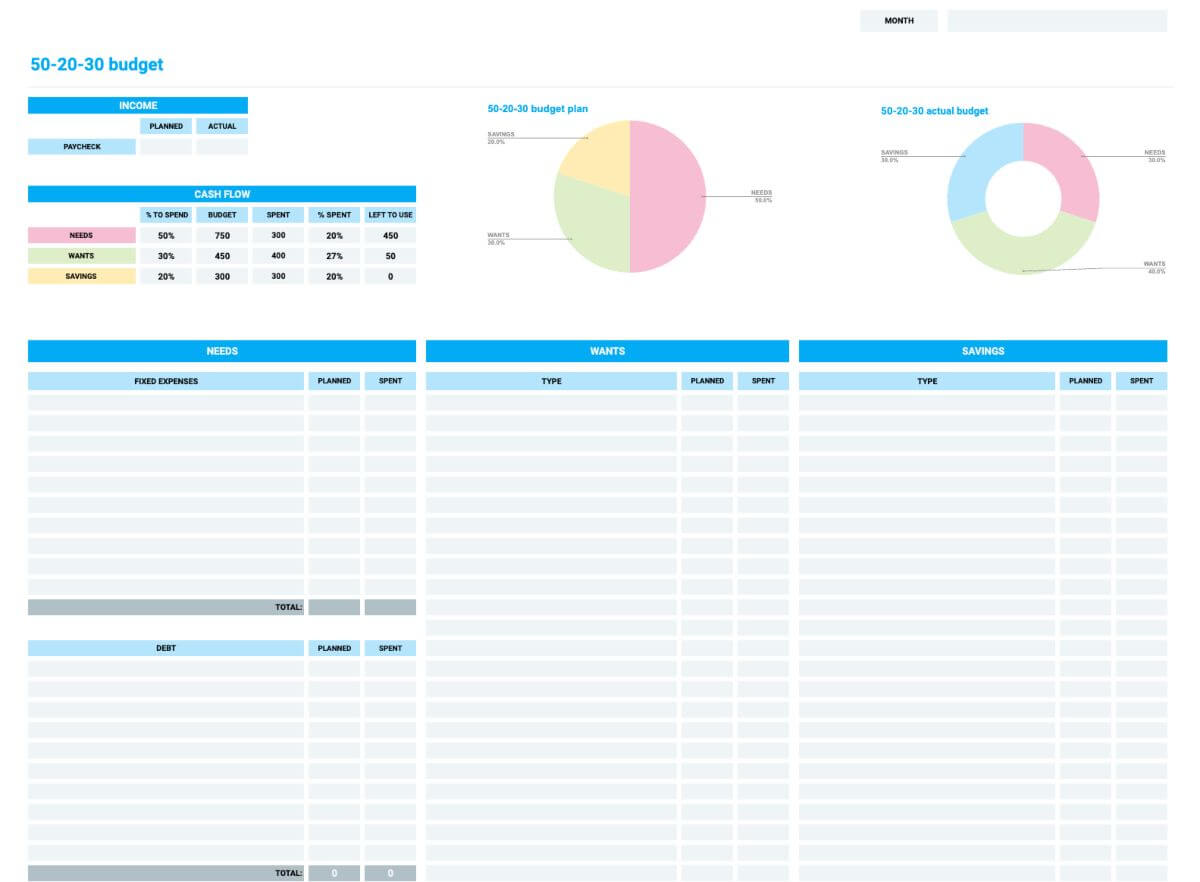
Image source: Clockify
Privacy-First Budgeting Tools That Don't Require a Cloud Account
In an era of frequent data breaches, many consumers are deeply uncomfortable linking their bank accounts to third-party apps or even storing their financial data on Google or Microsoft servers. If privacy is your primary concern, there are excellent offline and session-based alternatives.
LibreOffice Calc for 100% Offline Use
According to WalletHub's analysis of free budgeting tools, LibreOffice Calc is a standout option for privacy purists. LibreOffice is a free, open-source office suite that runs entirely locally on your computer. It does not require an account, it does not sync to the cloud, and it is fully compatible with Microsoft Excel formats. You can download any free Excel budget template, open it in LibreOffice Calc, and track your finances with the assurance that your data never leaves your hard drive.
Schwab Moneywise Monthly Planner
If you want the convenience of a web-based tool without the data retention, the Schwab Moneywise Monthly Budget Planner is a unique solution. This interactive web tool allows you to input your income and expenses to generate a budget breakdown. However, it is designed as a session-only tool. Once you close your browser, the data is wiped. It is an excellent choice for a quick, secure financial checkup without creating an account.
How to Set Up Your New Budget Template in 5 Minutes
Once you have selected your platform and downloaded a template, the initial setup can feel daunting. Follow these streamlined steps to get your budget running efficiently:
- Gather your "Big Three" numbers: Before opening the template, check your bank statements to find your exact monthly after-tax income, your fixed recurring costs (rent, insurance, subscriptions), and your minimum debt payments. Having these ready prevents you from abandoning the setup process halfway through.
- Customize your categories: Most templates come with generic categories like "Auto" or "Personal Care." Rename these to match your actual life. If you don't own a car, change "Auto" to "Public Transit." The more personalized the categories, the easier it is to log transactions.
- Execute the "Duplicate Sheet" hack: This is a crucial tip for spreadsheet users. Before you enter a single daily transaction, set up all your fixed income and fixed expenses. Then, stop. Right-click the tab at the bottom of the screen and select "Duplicate." Rename the original tab to "MASTER TEMPLATE" and the new tab to the current month (e.g., "June 2026"). Next month, you simply duplicate the master template again, saving you from having to delete old transactions or accidentally breaking formulas.
Frequently Asked Questions
Does Google Sheets have a built-in budget template?
What is a good free budget template for absolute beginners?
Is Microsoft Excel really free for budgeting?
How do I track a budget if my income changes every month?
What is the difference between a budget spreadsheet and a budget app?
Are free budget templates safe to use?
Final Thoughts on Finding Your Perfect Budget Template
Taking control of your finances does not require expensive software or complex accounting degrees. The most effective budgeting tool is simply the one you will consistently use. By leveraging free templates, you can organize your money, pay down debt, and build savings without adding another subscription fee to your monthly expenses.
- Platform choice dictates workflow: Choose Google Sheets for collaboration, Excel for complex data, or Notion for all-in-one workspace integration.
- Manual entry builds awareness: Typing out your transactions manually forces you to confront your spending habits, often leading to better financial decisions than automated apps.
- Adjust rules for your reality: If you live in a high-cost area, do not be afraid to modify the standard 50/30/20 rule to a 60/30/10 split to account for expensive housing.
- Protect your privacy: Use offline tools like LibreOffice Calc if you are uncomfortable storing financial data on cloud servers.
- Use the duplicate hack: Always keep a clean Master Template with your fixed expenses filled out, and duplicate it each month to save time and preserve formulas.